
How to Use a VA Loan Calculator
Follow a VA loan calculator guide covering loan details, ownership costs, extra payments, results, a worked example, and mortgage comparisons.
How does this guide help you use the VA Loan Calculator?
This guide explains which values to enter, how the VA Loan Calculator processes them, and how to read the resulting estimate. Follow the sections below to check assumptions, compare realistic scenarios, avoid common input mistakes, and understand when an official source or qualified professional should take priority over a planning result.
A VA mortgage estimate combines the base purchase loan, any financed funding fee, fixed principal and interest, property costs and cash needed at closing. This guide explains what to enter and how to interpret the output without treating it as an eligibility or lending decision.
Use the VA Loan Calculator to create a planning scenario, then compare the result with official disclosures from qualified lenders.
Before You Start
Gather documents and property-specific estimates before calculating. The Certificate of Eligibility and lender review determine details that the form cannot infer.
- Expected purchase price and optional cash down payment.
- A fixed annual note-rate scenario and loan term.
- Certificate of Eligibility information, including first or subsequent use and entitlement status.
- VA- or lender-confirmed funding-fee exemption status.
- Annual property tax, homeowners insurance and monthly HOA estimates.
- Borrower-paid closing costs and the choice to finance or pay the funding fee at closing.
Loan Details
- Purchase price: enter the contract-price scenario. The maximum loan on a property remains subject to the lower of purchase price or appraised value and lender approval.
- Down payment: enter cash applied directly to the purchase. The percentage determines the modeled purchase funding-fee tier.
- Interest rate: enter an annual fixed note rate, such as 6.25 for 6.25%. It is not a live rate quote.
- Loan term: choose the scheduled amortization period.
- Benefit use: select first or subsequent use based on the lender's COE review. The distinction changes the below-5% funding-fee rate.
- Funding-fee exemption: select exempt only when VA or the lender confirms that status.
- Entitlement: use the full-entitlement selection for guidance only. The engine does not calculate remaining bonus entitlement.
Ownership Costs
Enter annual property tax, annual homeowners insurance and monthly HOA or condominium dues. The calculator adds one-twelfth of the annual amounts to the fixed principal-and-interest payment.
Enter estimated borrower-paid closing costs. The cash-to-close estimate combines down payment and closing costs, plus the funding fee only when it is paid in cash.
Prepaid interest, initial escrow deposits, inspections, repairs, moving expenses, reserves, discount points, lender credits, grants, seller credits and concessions are not automatically modeled. VA states that only the funding fee, not other purchase closing costs, can be financed into this loan type.
Extra Payments
The VA calculator models the scheduled payment and does not apply voluntary extra principal. VA says a VA-backed purchase loan does not carry a prepayment penalty fee, but users should still confirm payment instructions with the servicer.
Transfer the financed loan amount, rate and term to the Extra Payment Calculator to compare monthly, annual, one-time and target-payoff strategies. Extra principal may reduce interest and shorten the loan term, but it does not refund a funding fee already paid.
Read the Results
- Initial monthly payment: principal, interest, property tax, homeowners insurance and HOA dues.
- Base VA loan: purchase price minus down payment.
- Funding fee: the rate and amount selected from use status, down-payment tier and exemption choice.
- Financed loan: base loan plus the funding fee when financing is selected.
- Cash to close: entered down payment and closing costs, plus a cash-paid funding fee when applicable.
- Total interest: interest from the scheduled amortization while the rate and payment remain unchanged.
- Annual schedule: beginning balance, principal, interest and ending balance by year.
Worked Example
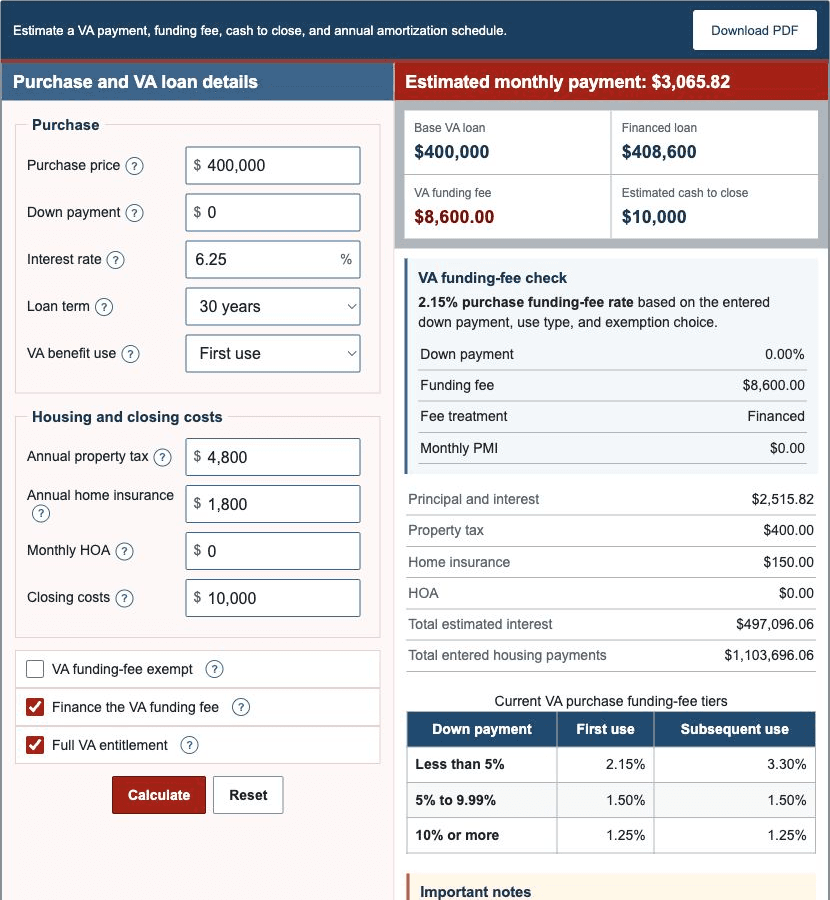
Assume a $400,000 purchase with zero down, first use, no confirmed exemption, a financed funding fee, 6.25% fixed rate, 30-year term, $4,800 annual property tax, $1,800 annual homeowners insurance, no HOA and $10,000 closing costs.
- Base loan: $400,000 - $0 = $400,000.00.
- Funding-fee rate: first use with less than 5% down = 2.15%.
- Funding fee: $400,000 x 2.15% = $8,600.00.
- Financed balance: $400,000 + $8,600 = $408,600.00.
- Principal and interest: $2,515.82 per month.
- Property tax and insurance add $550.00, producing an initial total of $3,065.82.
- Estimated cash to close is $10,000.00 because the fee is financed and there is no down payment.
See Example 1 for the complete scenario and comparison table.
Compare Loans
Run separate scenarios for zero down, 5% down, 10% down, first use, subsequent use and a confirmed exemption. Then compare VA-backed quotes with other programs for which the borrower may qualify.
- Compare the complete monthly payment, not only the note rate.
- Compare the base loan, financed funding fee, cash to close and total interest.
- Review lender fees, discount points, credits, concessions and prepaid items.
- Compare annual percentage rate, projected payments and five-year cost on Loan Estimates.
- Keep adequate emergency and home-maintenance reserves after closing.
The Mortgage Payment Calculator, FHA Loan Calculator and USDA Loan Calculator can organize alternative planning scenarios, but eligibility and official offers must be verified independently.
References
- U.S. Department of Veterans Affairs - Funding fee and loan closing costs
- U.S. Department of Veterans Affairs - Home loan entitlement and limits
- U.S. Department of Veterans Affairs - Home loan eligibility and COE
- U.S. Department of Veterans Affairs - Buying with a VA-backed loan
- Consumer Financial Protection Bureau - Loan Estimate explainer