
How to Use a Salary Calculator
Follow a step-by-step salary calculator guide for hourly, annual, biweekly, and monthly pay, work schedules, unpaid time, and job comparisons.
How does this guide help you use the Salary Calculator?
This guide explains which values to enter, how the Salary Calculator processes them, and how to read the resulting estimate. Follow the sections below to check assumptions, compare realistic scenarios, avoid common input mistakes, and understand when an official source or qualified professional should take priority over a planning result.
This guide explains each field in the Salary Calculator and shows how to compare hourly, annual, monthly, biweekly, and semi-monthly gross pay without hiding the work schedule.
The calculator converts gross pay only. It does not estimate taxes, benefits, overtime, bonuses, or net take-home pay.
Before You Start
Gather the gross rate or salary you want to convert and identify the period it covers. Then confirm the hours per week, workdays per week, and weeks per year for that role.
- Gross pay amount and pay period
- Currency used for display
- Scheduled hours and workdays per week
- Working weeks per year
- Any holiday or vacation days that are unpaid
Step 1: Enter Pay Details
Enter the pay amount and select Hour, Day, Week, Two weeks, Half month, Month, Quarter, or Year. Select the currency that matches the amount.
The currency setting formats the report; it does not perform an exchange-rate conversion. Keep every amount in one currency.
Step 2: Enter the Actual Work Schedule
Enter scheduled hours per week, workdays per week, and weeks per year. Hourly, daily, weekly, and biweekly conversions use these values, so a part-time or seasonal schedule produces a different annualized result from a standard full-time schedule.
Step 3: Handle Holidays and Vacation
Enter holiday and vacation days only when they should reduce gross pay. The calculator keeps the scheduled result unchanged and creates a separate unpaid-time-adjusted result.
If the employer pays those days at the normal rate, enter zero. Paid leave is part of the broader compensation package and should not be deducted from the salary conversion.
Step 4: Read the Results
- Scheduled annual gross: the entered rate annualized across the full schedule.
- Adjusted annual gross: scheduled gross multiplied by the remaining-workday ratio.
- Gross reduction: the difference between those two annual amounts.
- Pay-period equivalents: hourly through annual values from the same annual base.
- Schedule metrics: scheduled and worked days and hours, time-off share, and effective hourly amount for worked time.
- Chart and table: visual and tabular comparisons of scheduled and adjusted amounts.
Worked Example: $50 per Hour
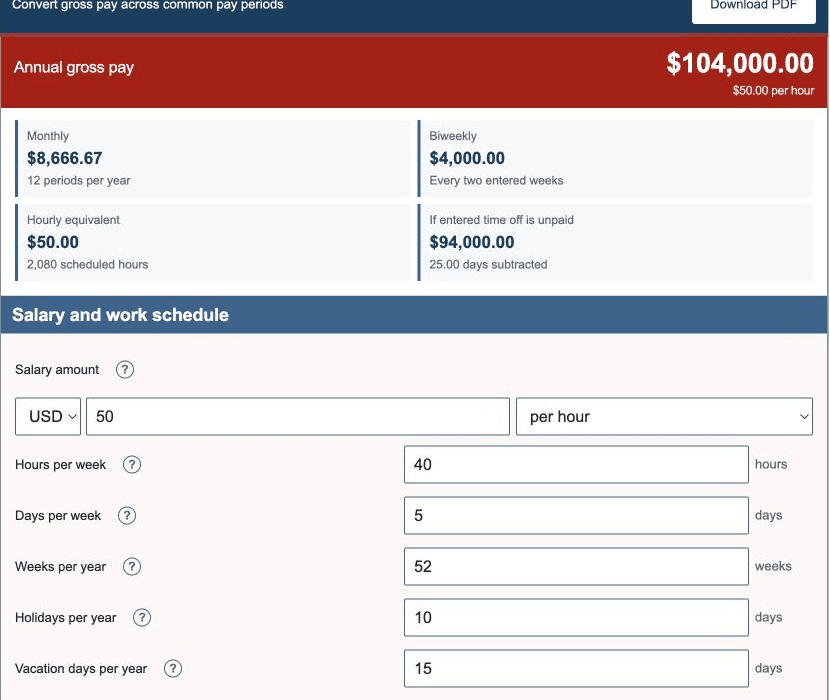
The default scenario uses $50 per hour, 40 hours per week, 5 workdays per week, 52 weeks per year, 10 holidays, and 15 vacation days. The entered 25 days are treated as unpaid in the adjusted column.
| Scheduled annual gross | $104,000.00 |
|---|---|
| Adjusted annual gross | $94,000.00 |
| Gross reduction | $10,000.00 |
| Monthly scheduled gross | $8,666.67 |
| Biweekly scheduled gross | $4,000.00 |
| Worked days | 235.00 |
These values are generated by the same production engine used on the calculator page.
Step 5: Compare Pay Periods Correctly
Biweekly means every two weeks. With 52 weeks, that is 26 periods. Semi-monthly means twice each month, or 24 periods. The check amounts differ even when annual gross pay is identical.
When comparing offers, normalize both amounts to annual gross or hourly gross with the same hours and weeks.
Step 6: Compare the Whole Job Offer
After normalizing gross pay, compare health coverage, retirement contributions, paid leave, bonuses, commissions, equity, overtime terms, schedule flexibility, commuting costs, and contractor expenses where applicable.
Change one calculator input at a time to isolate the effect of hours, weeks, or unpaid time. Use the Gross to Net Calculator for a separate deduction scenario.
References
- U.S. Department of Labor - Fact Sheet #22: Hours Worked Under the FLSA
- U.S. Bureau of Labor Statistics - Employee Benefits Concepts
Review the salary conversion formulas and worked salary examples for the exact arithmetic used here.