
How to Use a Mortgage Payment Calculator
Follow a step-by-step mortgage calculator guide to estimate principal, interest, taxes, insurance, PMI, HOA costs, extra payments, and payoff time.
How does this guide help you use the Mortgage Calculator?
This guide explains which values to enter, how the Mortgage Calculator processes them, and how to read the resulting estimate. Follow the sections below to check assumptions, compare realistic scenarios, avoid common input mistakes, and understand when an official source or qualified professional should take priority over a planning result.
A mortgage payment is more than principal and interest. A useful estimate also considers property tax, homeowners insurance, mortgage insurance, HOA dues, and other recurring costs. This guide explains each field in the Mortgage Payment Calculator, where to find realistic inputs, and how to read the payment breakdown and amortization schedule.
Use the calculator for planning, not as a loan approval or quote. Your lender, insurer, tax authority, and HOA determine the amounts that apply to a real property.
Before You Start: Gather the Right Numbers
Collect the following information before you calculate. Better inputs produce a more useful comparison.
- Home price: Use the purchase price, accepted offer, or a price you are testing.
- Down payment: Enter the cash you expect to apply to the purchase price, excluding closing costs unless you deliberately want to model them separately.
- Interest rate: Use the note rate from a lender scenario or Loan Estimate. Do not substitute APR for the note rate because APR includes certain loan costs.
- Loan term: Use the repayment period, such as 15, 20, or 30 years.
- Property tax: Check the current tax bill or local assessor. A sale can change the taxable value, so the seller's bill may not predict your future bill.
- Homeowners insurance: Ask an insurer for a property-specific quote instead of relying on a broad average.
- PMI or other mortgage insurance: Use the amount supplied by the lender when it applies.
- HOA and other costs: Review association documents, special assessments, ground rent, or other recurring charges.
Step 1: Enter the Purchase and Loan Details
Enter the home price
Type the full purchase price, not the loan amount. The calculator subtracts the down payment to estimate the starting principal balance.
Enter the down payment
Choose % to enter a percentage of the home price or select the dollar option to enter cash directly. For example, 20% of a $400,000 home is $80,000, leaving an estimated $320,000 loan before any financed fees.
Add the interest rate
Enter the annual fixed interest rate as a percentage. A rate of 6.5 means 6.5%, not 0.065. Even a small rate change can materially affect monthly principal and interest over a long term.
Select the loan term
Enter the number of years over which the scheduled balance is repaid. A shorter term usually increases the required monthly payment but reduces the number of interest-bearing months.
Choose the start date
Select the estimated first payment month and year. This anchors the payoff date and the monthly and annual amortization schedule.
Step 2: Add Taxes, Insurance, PMI, and HOA Costs
Keep Include taxes and ownership costs selected when you want a fuller housing budget. The Consumer Financial Protection Bureau explains that a total monthly mortgage payment can include principal, interest, taxes, homeowners insurance, and mortgage insurance. Escrow rules and actual bills vary, but leaving these items out can understate the cash needed each month. See the CFPB's explanation of principal and interest versus total monthly payment.
- Property taxes
- Enter an annual percentage of home value or an annual dollar amount. Use the selector beside the field to match your source.
- Home insurance
- Enter the annual premium or use the available unit selector. This is property insurance, not mortgage insurance.
- PMI insurance
- Enter the lender's annual mortgage insurance estimate when required. Conventional PMI is often associated with lower-equity loans, but eligibility and cancellation depend on the loan.
- HOA fee
- Include regular association dues. Add a known special assessment under other costs if it is recurring during the period you are modeling.
- Other costs
- Use this for recurring ownership expenses you want included in the cash-flow estimate. Do not add a one-time closing cost as though it repeats every year.
Open More options to model annual increases in taxes, insurance, HOA dues, or other expenses. Treat growth rates as scenarios, not promises. A 3% annual increase means each future year's amount is estimated from the prior year, so the change compounds.
Step 3: Test Extra Payments and Faster Payoff Options
Extra principal payments reduce the balance used to calculate future interest. The calculator can model three common patterns:
- Extra monthly: An additional amount paid with each regular payment.
- Extra yearly: One additional amount applied once per year.
- One-time extra payment: A lump sum applied in a month and year you choose.
You can also show the accelerated biweekly comparison. This planning view is equivalent to making one extra monthly payment over a year. Before acting on any strategy, confirm how your servicer credits partial or extra payments, whether it holds funds until a full payment is received, and whether the loan has any prepayment restriction.
Step 4: Calculate and Read the Mortgage Results
Select Calculate after changing the inputs. Then read the results in this order:
- Monthly mortgage payment: The scheduled principal-and-interest payment for the entered rate, term, and loan amount.
- Total out-of-pocket: The modeled mortgage payment plus the included taxes and ownership costs for the period shown.
- Payment breakdown: Compare principal, interest, property tax, insurance and PMI, and HOA or other costs. Only principal reduces the balance.
- Loan amount and down payment: Confirm that the calculator interpreted the purchase inputs as intended.
- Total interest: The sum of scheduled interest under the scenario. It changes when the rate, term, balance, or extra-payment plan changes.
- Payoff date: The estimated month and year the balance reaches zero if the modeled payments are made as scheduled.
How to read the amortization schedule
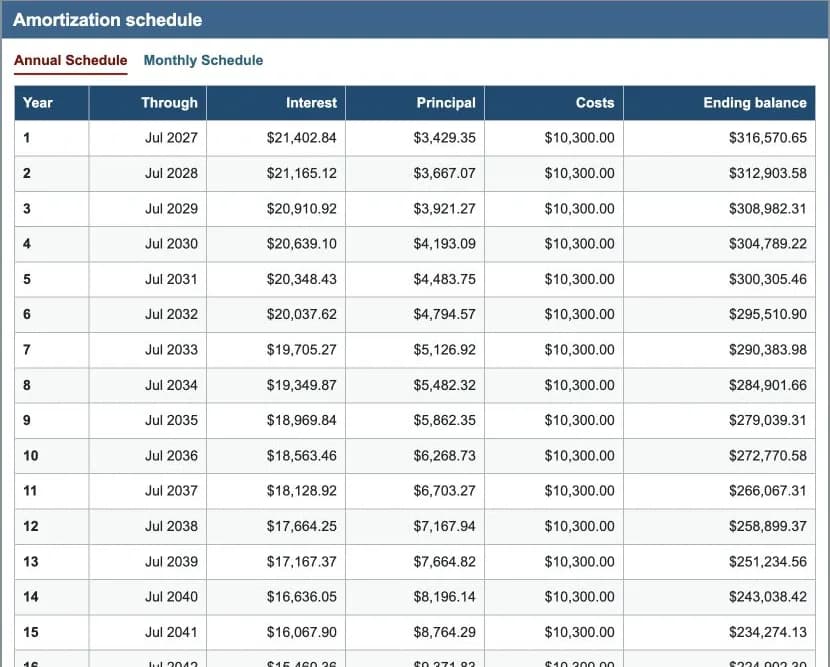
The annual schedule condenses the loan into year-by-year totals. The monthly schedule shows every payment period. In a standard fixed-rate amortizing loan, early payments generally send more money to interest because the outstanding balance is largest. As the balance declines, the interest portion falls and the principal portion grows.
Use the Ending balance column to see the estimated principal still owed after each period. Use Interest and Principal to understand where scheduled mortgage payments went. The Costs column shows modeled ownership costs and does not reduce the loan balance.
Worked Example: From Inputs to Monthly Housing Cost
Suppose a buyer tests the following planning scenario:
| Input | Example value | Why it matters |
|---|---|---|
| Home price | $400,000 | Starting purchase price |
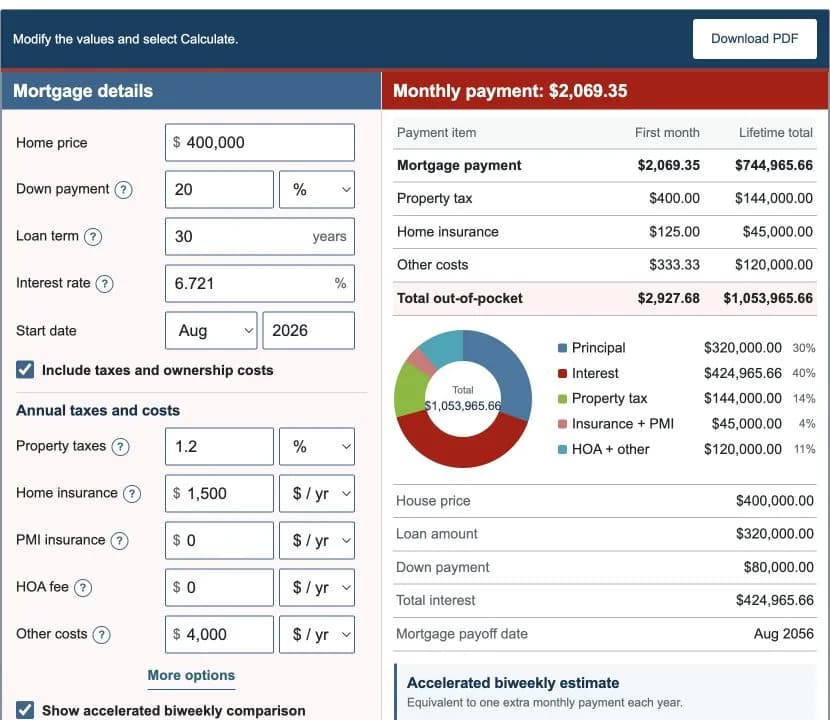
| Down payment | 20%, or $80,000 | Leaves a $320,000 starting loan balance |
| Loan term | 30 years | Sets 360 scheduled monthly periods |
| Interest rate | 6.721% | Determines scheduled interest in this example |
| Property tax | 1.2% annually | Models $4,800 in the first year, or $400 per month |
| Home insurance | $1,500 annually | Models $125 per month |
| Other costs | $4,000 annually | Models about $333.33 per month |
With those illustrative values, the calculator shows about $2,069.35 in monthly principal and interest. Adding $400 in property tax, $125 in insurance, and about $333.33 in other modeled costs produces an initial total out-of-pocket estimate of about $2,927.68 per month. This is an example, not a current market rate or a quote for any property.
The example demonstrates why a payment advertised as principal and interest can be lower than the household's actual monthly housing outflow. Try the same home price with a smaller down payment, a different rate, or a shorter term to see which factor changes the result most.
Step 5: Compare Scenarios Without Mixing Assumptions
For a useful comparison, duplicate the same baseline and change one variable at a time:
- Compare 15-year and 30-year terms while keeping price, down payment, and rate assumptions documented.
- Compare two interest rates using the same loan amount and term.
- Test 10% and 20% down payments, then add the applicable PMI estimate to the lower-down-payment scenario.
- Compare the original schedule with an extra monthly principal payment.
- Test a higher property-tax or insurance scenario to create room for uncertainty.
When you have lender offers, compare the calculator with each official Loan Estimate. The CFPB recommends comparing the same type and amount of loan and looking at interest rate, monthly principal and interest, mortgage insurance, estimated total payment, upfront loan costs, lender credits, and cash to close. Use the CFPB's loan offer comparison guidance and interactive Loan Estimate explainer alongside the estimate.
Common Mortgage Calculator Mistakes
- Entering the loan amount in the home-price field and then subtracting the down payment again.
- Using APR in the interest-rate field instead of the note rate.
- Leaving out taxes, insurance, PMI, or HOA dues when estimating a monthly budget.
- Entering a monthly bill in a field currently set to annual units, or the reverse.
- Assuming a seller's property-tax bill will remain unchanged after purchase.
- Treating every extra payment as guaranteed to be applied immediately to principal.
- Comparing loans with different balances, terms, or included costs without recording those differences.
What This Guide Can and Cannot Tell You
The guide can help you understand the relationship among purchase price, down payment, principal, interest, recurring ownership costs, extra payments, and amortization. It can also help you prepare questions for a lender and compare consistent scenarios. Review the Mortgage Calculator guide assumptions before relying on this result for decisions.
It cannot determine loan eligibility, the rate a lender will offer, the property's future tax bill, the correct insurance coverage, closing costs, escrow adjustments, or whether a payment is affordable for your full budget. For affordability planning, use the Home Affordability Calculator. For a focused payoff comparison, use the Extra Payment Calculator. Existing homeowners can compare a replacement loan with the Refinance Calculator.
References and Further Reading
- Consumer Financial Protection Bureau: principal and interest versus total monthly payment
- Consumer Financial Protection Bureau: Loan Estimate explainer
- Consumer Financial Protection Bureau: compare loan offers
- Consumer Financial Protection Bureau: conventional PMI cancellation
For the mathematics behind the result, read the mortgage payment and amortization formulas. For a checked numerical walkthrough, see the mortgage calculation examples.