
How to Use a Personal Loan Calculator
Follow a step-by-step personal loan calculator guide to compare payments, origination fees, cash proceeds, total interest, extra payments, and payoff dates.
How does this guide help you use the Personal Loan Calculator?
This guide explains which values to enter, how the Personal Loan Calculator processes them, and how to read the resulting estimate. Follow the sections below to check assumptions, compare realistic scenarios, avoid common input mistakes, and understand when an official source or qualified professional should take priority over a planning result.
This guide explains every major field in the Personal Loan Calculator, how origination fees change the amount financed or cash received, and how to compare payment and total cost without mixing assumptions.
Use the results for planning. The lender's written disclosures and loan agreement control the actual rate, APR, fees, payment schedule, and prepayment terms.
Before You Start: Gather the Loan Offer
Collect the same information for every loan you want to compare:
- Requested amount: the amount you want the lender to provide before any deducted fee.
- Fixed note rate: the annual rate applied to principal, not the lender-disclosed APR.
- Term: the number of years and months in the repayment schedule.
- Origination fee: the percentage or amount charged to originate the loan.
- Fee treatment: whether the fee is withheld from proceeds or added to the balance.
- First payment date: the month and year used to label the schedule.
Step 1: Enter the Personal Loan Details
Enter the requested amount
Use the amount stated in the offer. If you need a specific amount of usable cash, remember that a deducted fee can reduce the proceeds.
Enter the term
Use both year and month fields. Three years and zero months produces 36 scheduled monthly payments.
Enter the fixed annual interest rate
Enter 10 for a 10% note rate. Do not enter 0.10, and do not substitute APR for the note rate.
Select the first payment month and year
This choice labels the monthly schedule and determines the estimated payoff month. It does not change the interest calculation.
Step 2: Model the Origination Fee and Cash Proceeds
Enter the origination fee percentage exactly as quoted, then choose the treatment that matches the offer.
- Fee deducted
- The starting balance remains the requested amount. Net proceeds equal the requested amount minus the fee.
- Fee financed
- The full requested amount is available as proceeds. The fee is added to principal, increasing the payment and interest.
The CFPB notes that personal installment loans can include fees such as origination, documentation, optional insurance, and late charges. This calculator models only the origination fee you enter. Review the written offer for every other charge.
Step 3: Test an Extra Monthly Principal Payment
Enter only the amount you expect to pay above the required monthly payment. The calculator adds it to every modeled payment, caps the final payment at the remaining balance, and compares the accelerated schedule with the original schedule.
The model assumes the extra amount is credited to principal without a prepayment charge. Confirm those conditions with the lender. If the contract uses daily interest or a different posting method, actual savings may differ.
Step 4: Calculate and Read the Results
- Monthly payment: the scheduled principal-and-interest amount before any extra payment.
- Planned payment: the scheduled amount plus the extra monthly principal entered.
- Amount financed: the principal used by the payment formula.
- Net proceeds: the modeled cash available after a deducted fee.
- Total interest and fee-inclusive cost: the borrowing cost under the modeled schedule.
- Payoff dates and savings: compare the regular and accelerated schedules.
Use the annual table for a compact overview and the monthly table to audit individual periods. In each row, interest is calculated from the beginning balance; the rest of the payment reduces principal.
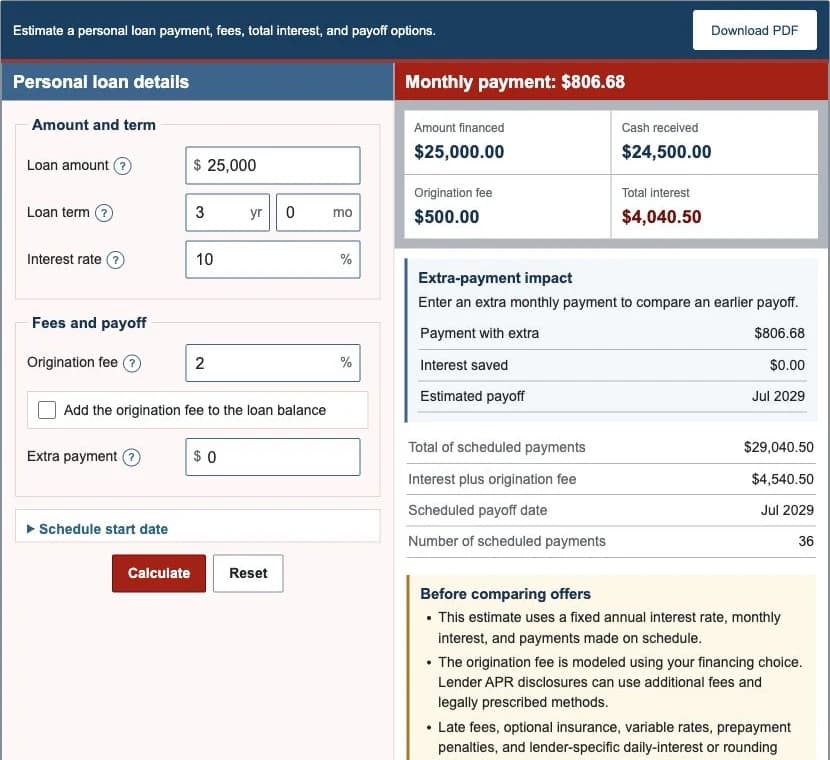
Worked Example: $25,000 at 10% for Three Years
| Requested amount | $25,000.00 |
|---|---|
| Origination fee | $500.00 deducted |
| Amount financed | $25,000.00 |
| Net proceeds | $24,500.00 |
| Scheduled payment | $806.68 |
| Total interest | $4,040.50 |
| Interest plus fee | $4,540.50 |
| Estimated payoff | Jul 2029 |
The first payment contains $208.33 of interest and $598.35 of principal. The schedule posts each amount to cents, which is why the total is tied to the generated payment rows rather than an unrounded payment multiplied by 36.
Step 5: Compare Personal Loan Offers
- Keep the requested amount and term identical for the first comparison.
- Compare lender-disclosed APR with APR, then inspect the note rate and fees separately.
- Check both the amount financed and the net proceeds.
- Review monthly affordability and total borrowing cost.
- Confirm whether the rate is fixed, how payments are applied, and whether prepayment terms exist.
- Check late fees, optional insurance, automatic-payment conditions, and every charge not modeled here.