
How to Use an Investment Calculator
Follow a step-by-step investment calculator guide for contributions, returns, fees, inflation, timing, target planning, and scenario results.
How does this guide help you use the Investment Calculator?
This guide explains which values to enter, how the Investment Calculator processes them, and how to read the resulting estimate. Follow the sections below to check assumptions, compare realistic scenarios, avoid common input mistakes, and understand when an official source or qualified professional should take priority over a planning result.
This guide explains every field in the Investment Calculator, including ongoing fees, return scenarios, inflation-adjusted value, contribution timing, and the numerical goal solver.
The calculator applies a constant return within each scenario. It does not predict market performance, select investments, or include every account, tax, and transaction rule.
Before You Start: Gather the Right Inputs
- Current balance: the amount already invested.
- Contribution plan: the monthly deposit and whether it enters at the beginning or end of the month.
- Time horizon: the number of whole years in the scenario.
- Expected return range: a base effective annual return and a reasonable range to test.
- Ongoing fees: use disclosed account, advisory, or product expenses that can reasonably be represented as an annual percentage.
- Inflation and target: choose assumptions that match the purpose and timing of the goal.
Step 1: Enter the Balance and Contributions
Enter the initial investment
Use the amount invested before the first modeled monthly contribution. Enter 0 if the scenario starts only with future deposits.
Enter the monthly contribution
Use the starting amount you expect to add each month. More options allows this amount to increase once per year.
Choose contribution timing
A beginning-of-month deposit receives that month's modeled growth. An end-of-month deposit enters after return and fees for that month.
Enter the investment length
Use 1 to 80 whole years. Longer projections become more sensitive to small changes in return, fees, and inflation.
Step 2: Enter Expected Return and Fees
The expected annual return is treated as an effective annual rate before the investment fee. Enter 7 for a 7% scenario. The engine converts it to an equivalent monthly rate.
Enter an ongoing annual fee such as an expense ratio or advisory percentage when appropriate. The calculator converts it to equivalent monthly deductions after gross return. It does not model sales loads, commissions, transfer fees, tax effects, or tiered pricing unless their effect is incorporated into the rate assumptions.
Step 3: Set Inflation, Goal, and Return Range
Enter an annual inflation assumption when you want the ending balance expressed in estimated current purchasing power. This does not change the nominal investment balance.
Enter the target amount in future nominal dollars. The calculator reports a surplus or gap and solves for the smallest starting monthly contribution that reaches the target under the same return, fee, timing, and annual contribution-increase assumptions.
The return range is measured in percentage points around the base return. A 7% base with a 2-point range produces 5%, 7%, and 9% scenarios. These paths are comparisons, not probabilities or confidence intervals.
Step 4: Calculate and Read the Results
- Ending balance: the nominal projected value after contributions, gross growth, and fees.
- Total contributions: starting balance plus every modeled monthly contribution.
- Net investment growth: ending balance minus total contributions.
- Investment fees: the monthly percentage deductions accumulated over the projection.
- Fee drag: fee-free ending balance minus the ending balance with fees.
- Value in today's dollars: ending balance discounted by the inflation assumption.
- Goal status: projected surplus or shortfall and the month the balance first reaches the target, when applicable.
- Monthly contribution needed: the solved starting monthly deposit for the entered target.
Use the return-path chart as a sensitivity test and the annual schedule as a text and table alternative for inspecting the calculation.
Worked Example: $10,000 Plus $500 Monthly
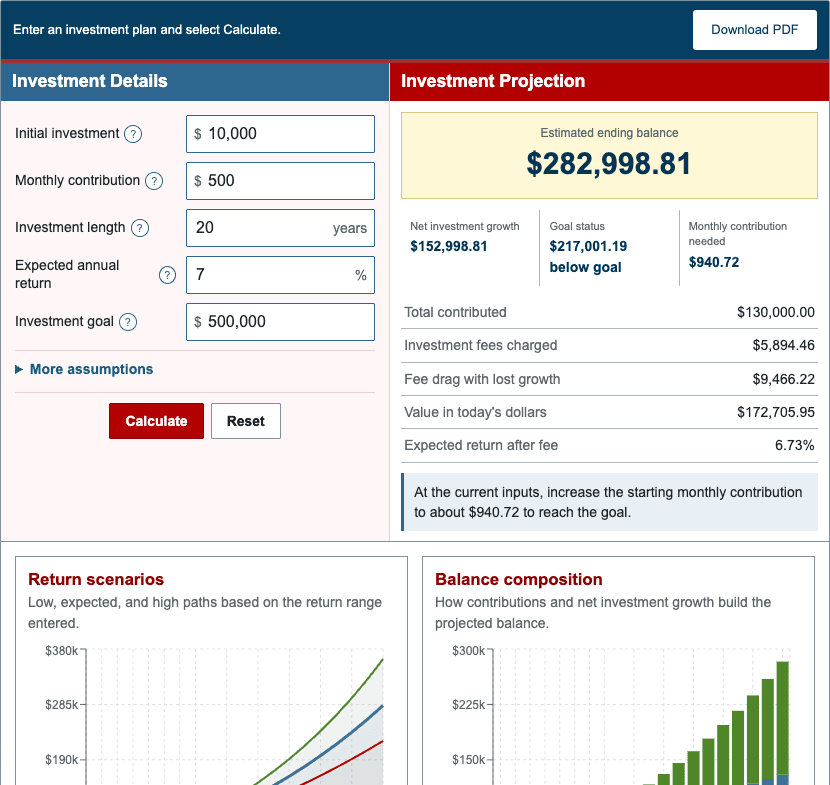
The default scenario starts with $10,000, adds $500 at each month-end for 20 years, assumes a 7% effective annual return, applies a 0.25% annual fee, and uses 2.5% inflation. The target is $500,000.
| Total contributions | $130,000.00 |
|---|---|
| Ending balance | $282,998.81 |
| Net investment growth | $152,998.81 |
| Fees deducted | $5,894.46 |
| Fee drag | $9,466.22 |
| Value in today's dollars | $172,705.95 |
| Goal gap | $217,001.19 |
| Starting contribution needed | $940.72 |
The result is below the $500,000 target under the base assumptions, so the solver reports a higher starting monthly contribution. It uses the same annual contribution increase and contribution timing as the projection.
Step 5: Compare Investment Scenarios Fairly
Change one input at a time. Compare contribution amounts first, then restore the contribution and compare fee levels. Test return assumptions last so the effect of savings behavior remains visible.
Use the low, base, and high return paths as a sensitivity range. A constant annual return produces a smooth illustration, while actual investments can rise or fall unevenly and may finish outside the displayed range.
For a savings model focused on compounding frequency, use the Compound Interest Calculator. For retirement income and retirement-age planning, use the Retirement Calculator.