
How to Use a Basic Calculator
Learn how to enter arithmetic, use percentages and memory, follow the order of operations, and check common calculator mistakes.
How does this guide help you use the Basic Calculator?
This guide explains which values to enter, how the Basic Calculator processes them, and how to read the resulting estimate. Follow the sections below to check assumptions, compare realistic scenarios, avoid common input mistakes, and understand when an official source or qualified professional should take priority over a planning result.
Entering a Calculation
Enter numbers with the keypad or keyboard, choose an arithmetic operation, and select equals or press Enter. Clear removes the current expression, while Backspace removes the most recent character.
- Enter the first number.
- Choose addition, subtraction, multiplication, or division.
- Enter the next number and select equals.
- Select a displayed result when you want to copy it.
Order of Operations
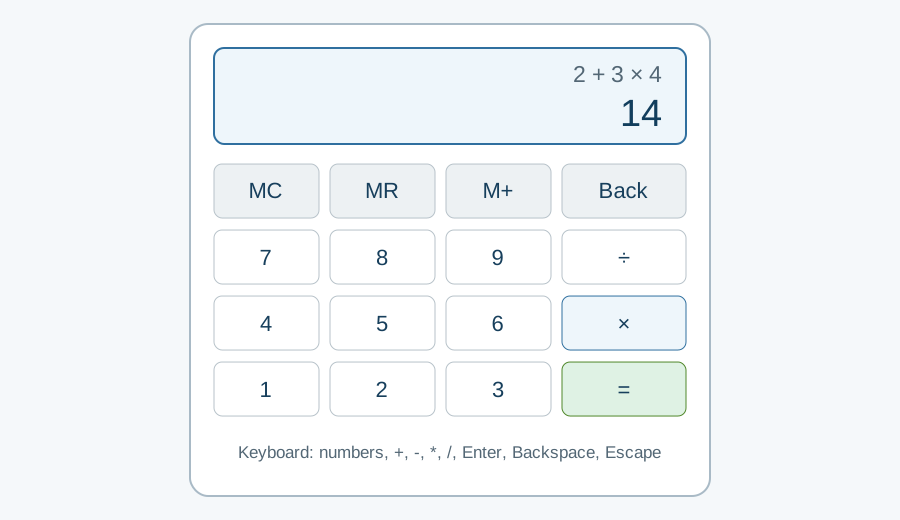
Multiplication and division are evaluated before addition and subtraction. Operations at the same level are evaluated from left to right. Use the Scientific Calculator when an expression needs parentheses, powers, roots, logarithms, or trigonometry.
Percentages and Memory
The percent key converts the value immediately before it to a fraction of 100. Memory controls let you store, add to, subtract from, and recall a value without retyping it.
Common Mistakes
Check negative signs, decimal placement, and the order of operations before relying on a result. Division by zero is undefined, and long decimal results may be rounded for display.
References
Report an issue or unclear result through the Contact Us page.