
How to Use an Auto Lease Calculator
Follow a step-by-step auto lease calculator guide for vehicle price, money factor, residual value, depreciation, tax, due at signing, and total cost.
How does this guide help you use the Auto Lease Calculator?
This guide explains which values to enter, how the Auto Lease Calculator processes them, and how to read the resulting estimate. Follow the sections below to check assumptions, compare realistic scenarios, avoid common input mistakes, and understand when an official source or qualified professional should take priority over a planning result.
This guide explains every major field in the Auto Lease Calculator, including money factor, residual value, adjusted capitalized cost, tax, due at signing, and the reverse target-payment mode.
Use the result as a planning estimate. The written lease disclosure and contract control the actual payment, fees, mileage terms, responsibilities, and purchase option.
Before You Start: Gather the Written Lease Terms
Collect the following from each offer:
- Negotiated vehicle price: use the agreed price, not only MSRP.
- Lease term: use the exact number of scheduled months.
- Rate: identify whether the quote is a money factor or a percentage.
- Capitalized-cost reductions: list cash, trade-in credit, rebates, and other reductions separately.
- Residual value: enter the contractual dollar amount used in the payment disclosure.
- Tax and fees: collect the local tax method and itemized acquisition, registration, documentation, disposition, or other charges.
- Mileage and wear terms: record the annual allowance and possible end-of-lease charges.
Step 1: Enter the Vehicle Price and Lease Term
Choose Total Price mode
Use this mode when the negotiated price is known and you want to estimate the monthly lease payment.
Enter the auto price
Enter the negotiated vehicle price before subtracting the down payment or trade-in credit. The calculator applies those values separately.
Enter the lease term
Use the exact number of months in the offer. Changing the term changes monthly depreciation and the total number of payments.
Step 2: Enter the Money Factor or Rate and Residual Value
Select Money Factor when the quote is a small decimal such as 0.00208. Select Interest Rate (%) when using the calculator's APR-style input, such as 4.992. The engine converts that percentage to a factor by dividing by 2,400.
Enter the residual value as a dollar amount, not a percentage. The calculator subtracts it from adjusted capitalized cost to estimate depreciation. A higher residual reduces modeled depreciation but can increase the lease-end purchase amount.
Step 3: Enter Down Payment, Trade-in Credit, and Tax
Enter cash down and trade-in value separately. The calculator treats both as capitalized-cost reductions:
Adjusted capitalized cost = vehicle price - down payment - trade-in credit.
Next, enter the tax rate used for the planning scenario. The current engine applies that rate to the estimated periodic payment and separately estimates tax on entered cash down. Actual lease taxation varies by jurisdiction and transaction structure.
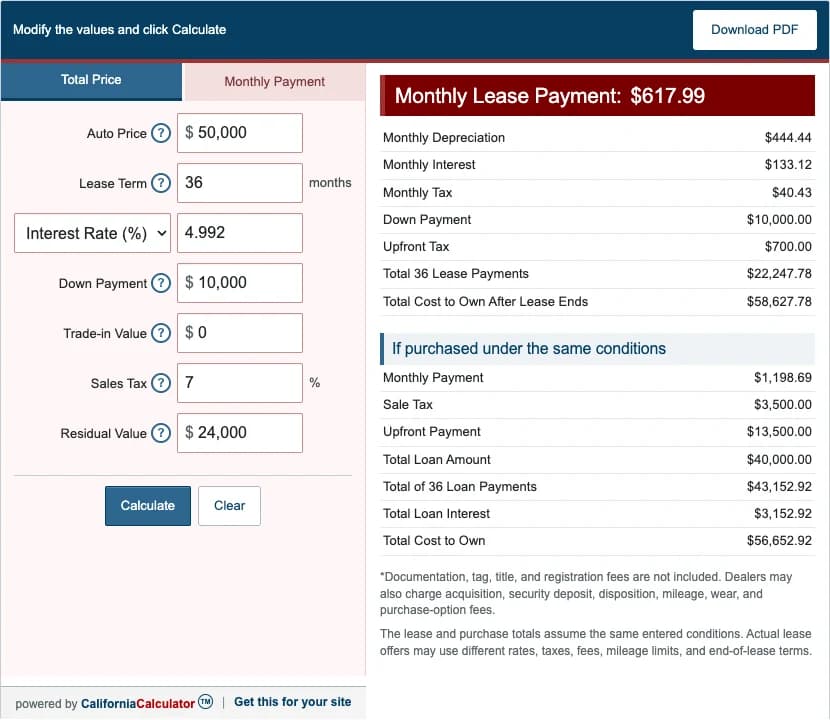
Step 4: Calculate and Read the Results
- Monthly lease payment: estimated depreciation, finance charge, and monthly tax.
- Monthly depreciation: adjusted capitalized cost minus residual, divided by the term.
- Monthly finance charge: adjusted capitalized cost plus residual, multiplied by the money factor.
- Due at signing: entered cash down plus the calculator's estimated tax on that amount.
- Total lease cost: scheduled lease payments plus entered cash down, trade-in credit, and estimated upfront tax.
- Total cost to own: total lease cost plus residual and estimated tax on the residual.
- Purchase comparison: a simplified same-term installment illustration, not a complete forecast of lease-versus-buy economics.
Worked Example: $50,000 Vehicle for 36 Months
| Vehicle price | $50,000.00 |
|---|---|
| Cash down | $10,000.00 |
| Adjusted capitalized cost | $40,000.00 |
| Residual value | $24,000.00 |
| Monthly depreciation | $444.44 |
| Monthly finance charge | $133.12 |
| Monthly tax | $40.43 |
| Monthly payment | $617.99 |
| Due at signing | $10,700.00 |
| Total lease cost | $32,947.78 |
The calculation uses a 0.00208 money factor, 7% entered tax rate, and $24,000 residual. It excludes acquisition, registration, first payment, mileage, wear, and disposition charges.
Step 5: Compare Auto Lease Offers
- Keep vehicle, term, mileage allowance, and cash due consistent.
- Compare negotiated vehicle price before comparing payment.
- Review adjusted capitalized cost, residual value, and rent charge.
- Ask for an itemization of the amount due at signing.
- Check acquisition, registration, documentation, disposition, mileage, wear, and purchase-option charges.
- Read the early-termination method and maintenance responsibilities.
- Confirm whether the lease includes a purchase option and how its amount is determined.
Regulation M requires applicable consumer-lease disclosures, including amount due at signing, payment calculation, total of payments, other charges, maintenance responsibilities, wear standards, and purchase-option information. Use the signed disclosure for the actual transaction.
References
- Consumer Financial Protection Bureau - Leasing versus buying a car
- Consumer Financial Protection Bureau - Regulation M lease disclosures
- Federal Trade Commission - Financing or leasing a car
Use the worked auto lease examples to reproduce three complete scenarios.