
How to Use the Water Intake Calculator
Learn how to use Basic and Advanced water intake modes, select age and sex references, add exercise or climate amounts, and read each result.
How does this guide help you use the Water Intake Calculator?
This guide explains which values to enter, how the Water Intake Calculator processes them, and how to read the resulting estimate. Follow the sections below to check assumptions, compare realistic scenarios, avoid common input mistakes, and understand when an official source or qualified professional should take priority over a planning result.
This guide explains every field in the Water Intake Calculator. Basic and Advanced modes answer different questions, so begin by choosing the method that matches the result you want to understand.
Before You Start
- Use age in completed years.
- Decide whether you want a weight-based planning estimate or an age-and-sex reference.
- Know that total water includes beverages and food moisture.
- Enter an exercise or climate addition only when you have a meaningful scenario amount.
- Do not use the calculator to manage illness or a medical fluid restriction.
Step 1: Choose Basic Calc or Advanced Calc
| Mode | Inputs | Starting point |
|---|---|---|
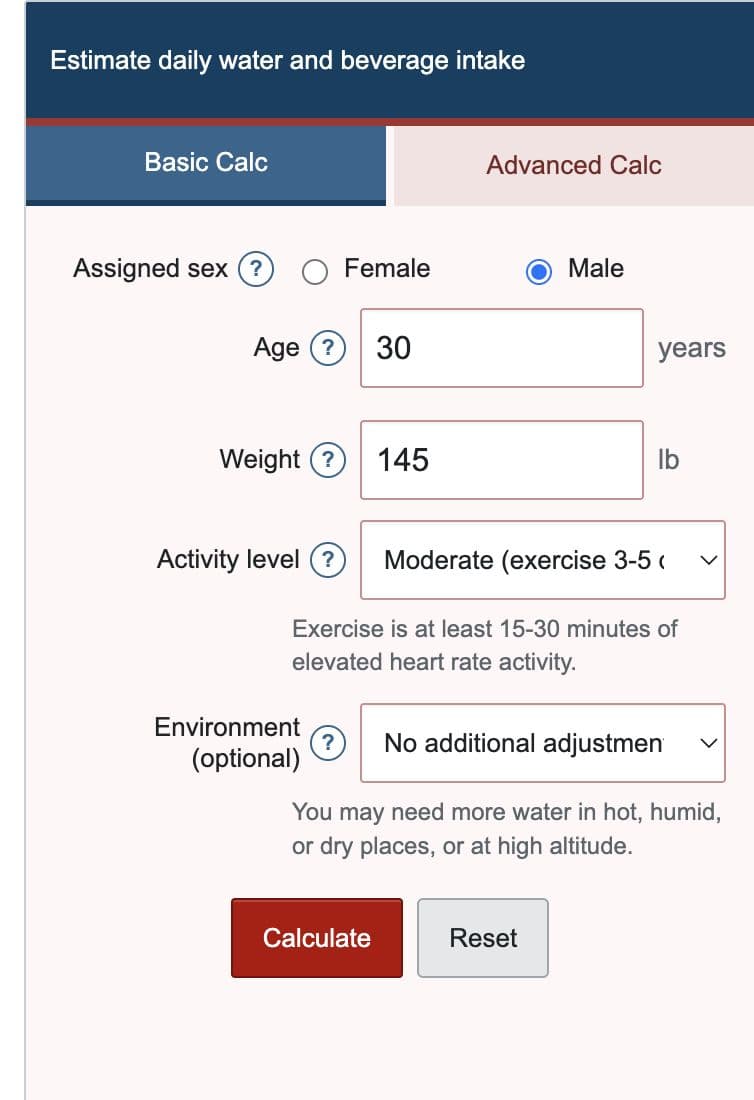
| Basic Calc | Sex, age, weight, activity, environment | Weight times a site-defined coefficient |
| Advanced Calc | Sex, age, exercise addition, climate addition, waking hours | National Academies age-and-sex reference |
Use Advanced Calc when the age group should determine the starting result. Use Basic Calc when you specifically want the simpler weight-based method.
Step 2: Enter Age, Sex, and Weight When Required
Age selects one of five reference groups. Female and male selections use the same values through age 8; separate values begin at age 9. In Basic Calc, weight changes the result while age changes only the comparison reference. In Advanced Calc, age and sex select the starting values and weight is not used.
Step 3: Select Presets or Enter Your Own Additions
Basic Calc uses fixed activity and environment presets shown in the form. Advanced Calc starts exercise and climate additions at zero and accepts the exact fluid-ounce amounts entered by the user.
Step 4: Select Calculate
The form checks that age is a whole number from 1 through 120, additions are not negative, and waking hours remain between 1 and 24. When the inputs pass validation, Calculate updates the result cards, charts, and PDF-ready data together.
Step 5: Read the Results in the Right Order
- Estimated beverages: water and other drinks, including entered additions.
- Total water: beverages plus the food-moisture reference.
- Food moisture: included in total water and not an extra amount to drink.
- Exercise and climate additions: values entered or selected in the form.
- Even hourly pace: beverages divided by waking hours for planning only.
Basic Calc also shows the National Academies age-and-sex total-water reference for comparison, but that reference does not drive the Basic result.
Step 6: Use the Charts and Hourly Pace
The component chart shows how beverages, food moisture, and additions combine. The age-reference chart compares life-stage values and highlights the selected reference. The pace chart spreads estimated beverages evenly across waking hours. Each visual has labels and a text or table equivalent, so color is not required to understand the result.
Worked Example: Adult Male Advanced Scenario
Select Advanced Calc, male, age 30, a 12 fl oz exercise addition, a 6 fl oz climate addition, and 16 waking hours.
| Selected reference | Male, age 19+ |
|---|---|
| Reference beverages | 101.44 fl oz |
| Entered additions | 18.00 fl oz |
| Estimated beverages | 119.44 fl oz |
| Estimated total water | 143.11 fl oz |
| Even hourly pace | 7.47 fl oz |
The 18 fl oz addition is part of this example, not a universal exercise or climate recommendation.
Limitations and Health Context
- Adequate Intake values describe population references, not exact individual needs.
- Basic coefficients and presets are California Calculator planning assumptions.
- The tool does not measure sweat loss, electrolyte loss, hydration status, or urine output.
- It excludes infants, pregnancy, breastfeeding, illness treatment, and medical fluid restrictions.
- Actual needs can change with diet, climate, activity, medications, and health conditions.
Seek individualized guidance for kidney, heart, liver, endocrine, or fluid-balance conditions; prolonged heavy sweating; vomiting, diarrhea, or fever; and medications that affect fluid balance.
References
- National Academies - Dietary Reference Intakes table for total water
- CDC - About Water and Healthier Drinks
- CDC/NIOSH - Workplace Heat and Hydration Recommendations
Return to the Water Intake Calculator or review the complete formulas and reference table.