
How to Use the VAT Calculator
Follow a step-by-step VAT guide to enter two known values, add or remove VAT, find an implied rate, and interpret net, tax, and gross results.
How does this guide help you use the VAT Calculator?
This guide explains which values to enter, how the VAT Calculator processes them, and how to read the resulting estimate. Follow the sections below to check assumptions, compare realistic scenarios, avoid common input mistakes, and understand when an official source or qualified professional should take priority over a planning result.
This guide explains how to use the VAT Calculator with any valid pair of known values. The calculator solves the arithmetic; the user must identify the correct VAT treatment and transaction values.
Before You Start
Gather one internally consistent transaction scenario.
- Transaction currency
- Applicable VAT rate, when known
- Net price before VAT, when known
- VAT-inclusive gross price, when known
- VAT amount shown on a quote or invoice, when known
Step 1: Select the Display Currency
Search by currency code or name and select the currency used by the transaction. This setting formats amounts only. It does not convert currencies or select a country's VAT rules.
Step 2: Enter Exactly Two Known Values
Enter any valid pair among VAT rate, net price, VAT amount, and gross price. Leave the remaining two fields empty so the engine can identify what to solve.
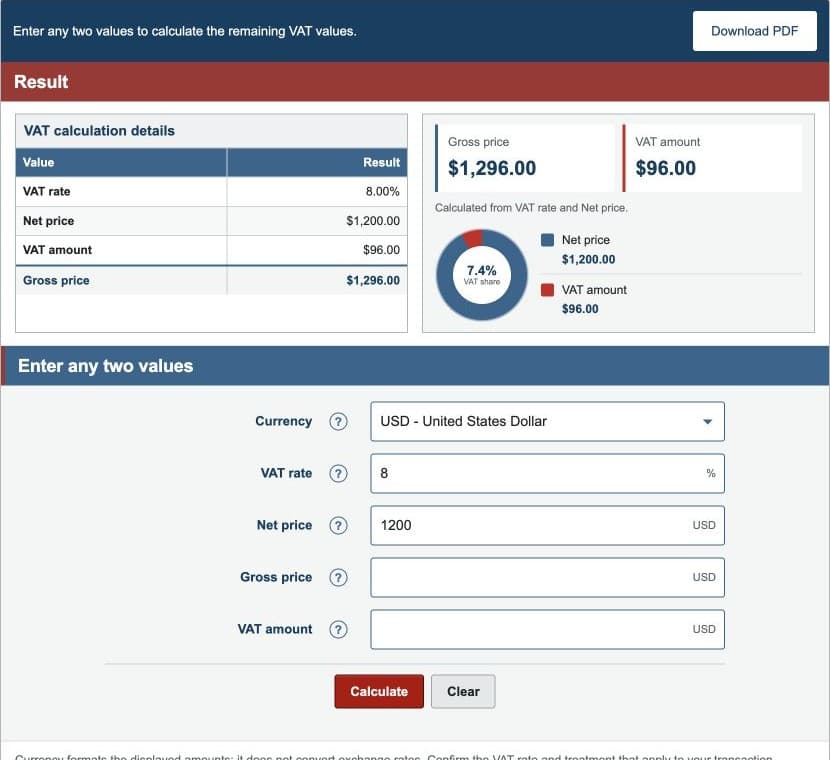
Step 3A: Add VAT to a Net Price
Enter VAT rate and net price. The calculator multiplies net price by the decimal rate to find VAT, then adds VAT to net price to find gross price.
Step 3B: Remove VAT From a Gross Price
Enter VAT rate and gross price. The calculator divides gross by the VAT multiplier to recover net price. Gross minus net is the included VAT amount.
Step 3C: Find an Implied VAT Rate
Enter net price with gross price or VAT amount. The engine calculates VAT as needed, divides VAT by net price, and converts the decimal to a percentage.
Step 4: Read the Results
- VAT rate: the entered or calculated percentage.
- Net price: the modeled price before VAT.
- VAT amount: the difference between gross and net.
- Gross price: net price plus VAT.
- Multiplier: one plus the rate written as a decimal.
The source-field summary identifies which two values were entered.
Worked Example: Add 8% VAT
The default scenario uses a $1,200.00 net price and an 8% rate.
| Net price | $1,200.00 |
|---|---|
| VAT rate | 8.00% |
| VAT amount | $96.00 |
| Gross price | $1,296.00 |
| Multiplier | 1.0800 |
These values come from the same production engine used by the calculator and Examples page.
Step 5: Verify the Transaction Assumptions
- Confirm the place of taxation or supply.
- Confirm whether the supply is standard-rated, reduced-rated, zero-rated, or exempt.
- Confirm which charges belong in the taxable base.
- Keep all monetary inputs in the same currency.
- Apply the jurisdiction's required invoice-rounding method.
References
- European Commission - VAT Rates
- European Commission - Place of Taxation
- HM Revenue & Customs - VAT Rates on Different Goods and Services
Review the VAT formulas and worked VAT examples for the exact arithmetic.