
How to Use the TDEE Calculator
Learn how to enter current measurements, choose a BMR formula and activity factor, compare maintenance calories, and calibrate a TDEE estimate.
How does this guide help you use the TDEE Calculator?
This guide explains which values to enter, how the TDEE Calculator processes them, and how to read the resulting estimate. Follow the sections below to check assumptions, compare realistic scenarios, avoid common input mistakes, and understand when an official source or qualified professional should take priority over a planning result.
This guide explains how to use the TDEE Calculator without treating an activity multiplier as a measurement. The activity factor is usually the most influential user-controlled assumption.
Before You Start
- Use current measurements rather than a goal weight.
- Choose an average period that reflects your normal work, movement, and training.
- Do not count the same exercise once in the factor and again as added calories.
- Keep calibration at zero unless a consistent trend supports an adjustment.
- Do not use this adult calculator for children, pregnancy, breastfeeding, illness, or medical nutrition therapy.
Step 1: Enter Current Measurements
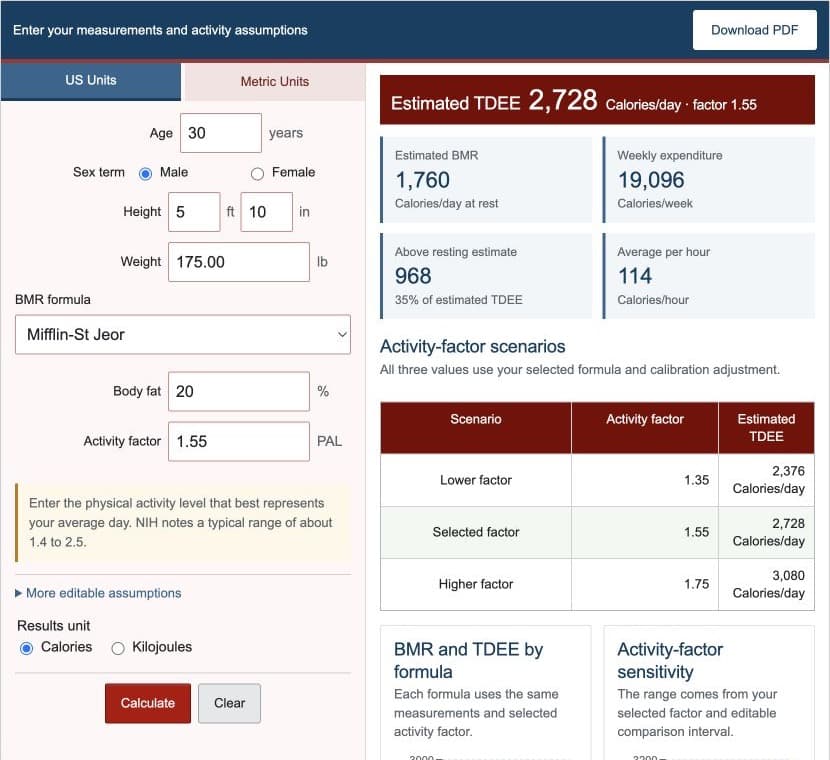
Enter age in completed years, current height, and current body weight. Select U.S. units for feet, inches, and pounds or metric units for centimeters and kilograms. The engine normalizes measurements before running any equation.
Step 2: Choose the BMR Inputs and Formula
| Formula | Inputs used | Important limitation |
|---|---|---|
| Mifflin-St Jeor | Weight, height, age, sex term | Population estimate, not direct measurement |
| Revised Harris-Benedict | Weight, height, age, sex term | Different coefficients can change TDEE |
| Katch-McArdle | Weight and body-fat percentage | Depends directly on body-fat accuracy |
Mifflin-St Jeor is the default. The male or female selection applies to the published sex-specific equations; Katch-McArdle uses lean mass instead.
Step 3: Enter an Activity Factor
Enter the physical activity level that best represents the average period you want to estimate. The factor should reflect work, ordinary movement, and exercise together. NIDDK notes that typical physical activity level values often range from about 1.4 to 2.5, but the correct planning assumption can vary.
Step 4: Set the Comparison Range
The comparison interval creates a lower and higher factor around the selected value. With a selected factor of 1.55 and a range of 0.20, the calculator compares 1.35, 1.55, and 1.75. It does not claim that these values form a confidence interval.
Step 5: Use Calibration Carefully
Calibration applies a percentage adjustment to the central TDEE and every activity scenario. Leave it at 0% unless a consistent record of intake and body-weight trends suggests that the estimate is systematically high or low.
- Use the same intake-tracking method each day.
- Measure weight under similar conditions and compare weekly averages.
- Observe long enough to reduce the influence of normal daily fluctuation.
- Record changes in training, movement, health, sleep, and medication.
- Make gradual adjustments rather than calibrating from one result.
Step 6: Choose Calories or Kilojoules
The result-unit setting changes display units only. One dietary Calorie equals 4.184 kilojoules. It does not change the BMR formula, activity factor, or calibration.
Step 7: Read the Results
- Estimated TDEE: selected BMR multiplied by activity and calibration.
- Estimated BMR: the selected resting-energy equation.
- Weekly expenditure: daily TDEE multiplied by seven.
- Average per hour: daily TDEE divided by 24.
- Above resting estimate: TDEE minus BMR.
- Activity-factor scenarios: lower, selected, and higher factor results.
- Formula comparison: TDEE from all three BMR equations.
The above-resting metric is a mathematical residual from the model. It is not a separate measurement of exercise or digestion.
Step 8: Use the Charts and Text Alternatives
The formula chart holds activity and calibration constant while changing the BMR equation. The sensitivity chart holds the selected BMR formula and calibration constant while changing the activity factor. Tables provide the same values for users who cannot use the visual charts.
Worked Example: Estimated Maintenance Calories
A 30-year-old man is 5 feet 10 inches tall, weighs 175 pounds, selects Mifflin-St Jeor, enters an activity factor of 1.55, and leaves calibration at zero.
| Metric height | 177.80 cm |
|---|---|
| Metric weight | 79.38 kg |
| Estimated BMR | 1760 Calories/day |
| Estimated TDEE | 2728 Calories/day |
| Weekly equivalent | 19096 Calories/week |
| Above resting estimate | 968 Calories/day |
These values are generated by the same tested engine as the live calculator.
Step 9: Understand the Limitations
- BMR equations estimate resting energy from population data.
- The activity factor is a broad planning multiplier, not a wearable measurement.
- Katch-McArdle inherits body-fat measurement error.
- The model does not predict metabolic adaptation over time.
- Food tracking, body weight, and activity estimates all contain error.
- A predicted TDEE can differ from observed maintenance intake.
References
- Mifflin and colleagues - Resting Energy Expenditure Equation
- Roza and Shizgal - Revised Harris-Benedict Equations
- NIDDK - Body Weight Planner
- Frankenfield and colleagues - Predictive Equation Systematic Review
Review the complete TDEE formulas and worked TDEE examples for reproducible calculations.