
How to Use the Self-Employment Tax Calculator
Follow a step-by-step self-employment tax guide for net profit, Schedule SE, W-2 wage coordination, Medicare, deductions, and quarterly planning.
How does this guide help you use the Self-Employment Tax Calculator?
This guide explains which values to enter, how the Self-Employment Tax Calculator processes them, and how to read the resulting estimate. Follow the sections below to check assumptions, compare realistic scenarios, avoid common input mistakes, and understand when an official source or qualified professional should take priority over a planning result.
This guide explains how to enter one consistent annual scenario in the Self-Employment Tax Calculator. The tool models the regular Schedule SE method and coordinates entered wages with the Social Security and Additional Medicare Tax limits.
Before You Start
Gather records for the same tax year. Useful records can include Schedule C or partnership information, Forms 1099, Forms W-2, and a current estimate of deductible business expenses.
- Qualifying annual net business profit after expenses
- W-2 box 3 Social Security wages and box 7 Social Security tips, when applicable
- W-2 box 5 Medicare wages
- A spouse's Medicare wages for a joint return
- The expected federal filing status
Step 1: Enter the Tax Year and Filing Status
Enter the year being modeled and choose the filing status expected on the federal return. The calculator supports verified 2025 and 2026 rule sets; another entered year uses the nearest supported rules year and identifies that choice in the results.
Filing status does not change the base 12.4% Social Security or 2.9% Medicare rates. It changes the threshold used for Additional Medicare Tax.
Step 2: Enter Net Business Profit
Enter annual qualifying net profit after ordinary business expenses. A sole proprietor commonly starts with Schedule C line 31, but partnership, farm, clergy, and other situations can follow different rules.
If regular-method net earnings are below $400, the calculator shows zero Schedule SE tax. Other filing or income-tax requirements may still apply.
Step 3: Enter W-2 Social Security and Medicare Wages
Enter covered Social Security wages so the tool can determine how much of the annual wage base remains for self-employment earnings. If W-2 Social Security wages already reach the annual base, the calculator applies no additional 12.4% Social Security tax to self-employment earnings.
Enter Medicare wages separately. Medicare has no comparable annual wage cap, but wages reduce the filing-status threshold remaining before Additional Medicare Tax applies to self-employment income. Joint filers can also enter a spouse's Medicare wages.
Step 4: Calculate the Estimate
Select Calculate after reviewing the entered values. Validation identifies invalid or missing amounts before the result is updated. The Clear button restores the editable example values.
Step 5: Read the Results
- Estimated self-employment tax: the modeled Social Security, Medicare, and Additional Medicare Tax components.
- Net earnings after 92.35%: the regular Schedule SE base used by the calculator.
- Remaining Social Security wage base: the supported annual limit minus entered W-2 Social Security wages.
- Deductible half: 50% of base Social Security and Medicare self-employment tax, excluding Additional Medicare Tax.
- Quarterly reserve: one-fourth of the calculator's total tax estimate.
- Effective rate: total calculated self-employment tax divided by entered net profit.
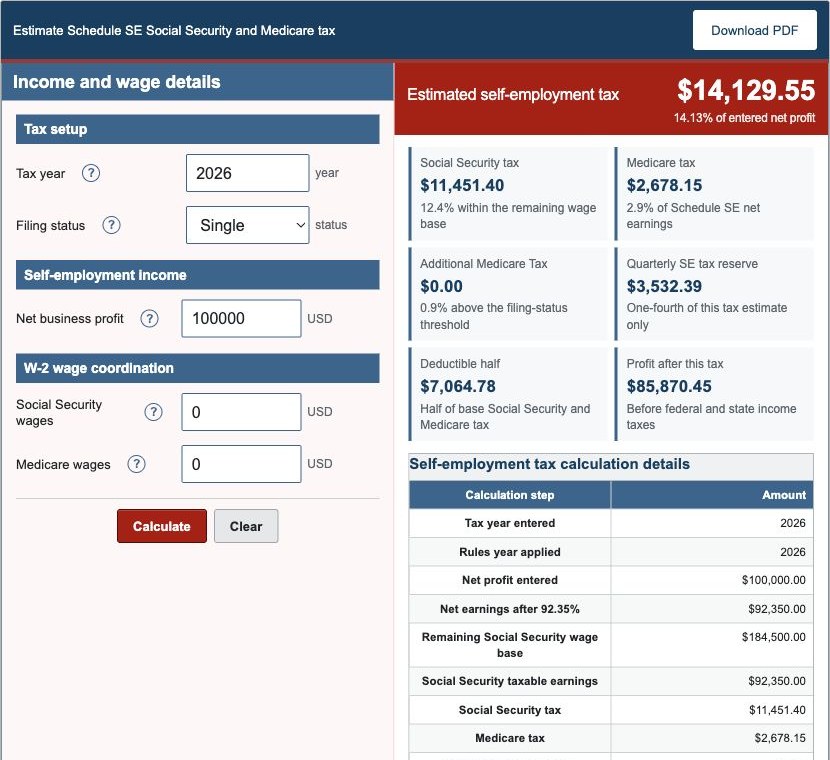
Worked Example: $100,000 Net Profit in 2026
The default scenario uses a single filer with $100,000.00 of net profit and no W-2 wages. The production engine returns:
| Schedule SE net earnings | $92,350.00 |
|---|---|
| Social Security tax | $11,451.40 |
| Medicare tax | $2,678.15 |
| Additional Medicare Tax | $0.00 |
| Total self-employment tax | $14,129.55 |
| Deductible half | $7,064.78 |
| Quarterly reserve | $3,532.39 |
The same engine values are used on the calculator and Examples pages.
Step 6: Use the Quarterly Result Carefully
The quarterly reserve is total calculated self-employment-related tax divided by four. It is a cash-planning figure, not a complete required estimated-tax payment. Form 1040-ES planning can also depend on income tax, credits, withholding, prior-year tax, payment timing, and safe-harbor rules.
Important Limitations
The tool models the regular Schedule SE method. It does not model optional methods, clergy or church-employee rules, farm-specific rules, every partnership allocation, multiple Schedule SE forms, qualified business income, regular income tax, state tax, estimated-tax penalties, or complete return preparation.
Use current IRS forms or qualified tax guidance for filing and payment decisions.
References
- Internal Revenue Service - 2025 Schedule SE (Form 1040)
- Internal Revenue Service - Topic 554, Self-Employment Tax
- Internal Revenue Service - Topic 560, Additional Medicare Tax
- Internal Revenue Service - Publication 505 (2026), Tax Withholding and Estimated Tax
- Social Security Administration - Contribution and Benefit Base
Review the self-employment tax formulas and worked Schedule SE examples for the exact modeled sequence.