
How to Use a Roth IRA Calculator
Follow a step-by-step 2026 Roth IRA calculator guide for MAGI eligibility, compensation, monthly deposits, catch-up contributions, fees, and goals.
How does this guide help you use the Roth IRA Calculator?
This guide explains which values to enter, how the Roth IRA Calculator processes them, and how to read the resulting estimate. Follow the sections below to check assumptions, compare realistic scenarios, avoid common input mistakes, and understand when an official source or qualified professional should take priority over a planning result.
This guide explains the eligibility and investment fields in the Roth IRA Calculator. It covers direct 2026 contributions only, not conversions or backdoor Roth transactions.
Tax rules and personal income can change. Treat the result as an educational estimate and confirm eligibility before contributing.
Before You Start
- Age at the end of the tax year.
- Federal filing status and estimated modified adjusted gross income.
- Taxable compensation for IRA purposes.
- Contributions assigned to other traditional or Roth IRAs.
- Current Roth IRA balance and a sustainable monthly deposit.
- Reasonable return, fee, inflation, and target assumptions.
Step 1: Enter Eligibility Inputs
Enter age at year end
The age-50 catch-up limit applies when the entered or projected age at year end is at least 50.
Select filing status
The calculator uses the corresponding 2026 direct Roth IRA MAGI phaseout range.
Enter estimated MAGI
Use an estimate prepared under the applicable IRA rules, not simply gross pay.
Enter taxable compensation
Compensation can reduce the contribution limit below the statutory amount.
Enter other IRA contributions
The annual limit is shared across your traditional and Roth IRAs.
Step 2: Review the Contribution Limits
The default 2026 inputs are $7,500 for the base IRA limit and $1,100 for the age-50 catch-up. Both are editable so the calculator does not hide these values inside the projection.
The engine caps the annual projected deposit at the estimated eligible amount. If your planned monthly deposits exceed that amount, the result identifies the excess plan for review.
Step 3: Enter Growth Assumptions
Enter the current balance, starting monthly contribution, projection length, expected effective annual return, annual investment fee, inflation, return range, and target. Choose whether deposits enter at the beginning or end of each month.
When catch-up modeling is enabled, the editable catch-up amount is added to the planned monthly contribution beginning with the first projected year at age 50, still subject to eligibility.
Step 4: Read the Results
- Estimated eligible limit: direct Roth IRA amount after compensation, income, and shared-limit rules.
- Projected first-year contribution: planned deposit capped at eligibility.
- Ending balance: nominal account value after contributions, gross returns, and fees.
- Contribution basis: current balance plus modeled deposits, used here only to separate projected growth.
- Fee drag: fee-free projection minus the projection with fees.
- Inflation-adjusted balance: estimated ending purchasing power in today's dollars.
- Goal result: surplus or gap and the first modeled year the target is reached.
- Required monthly contribution: solved starting deposit under the same annual caps and assumptions.
Worked Example: Full 2026 Eligibility
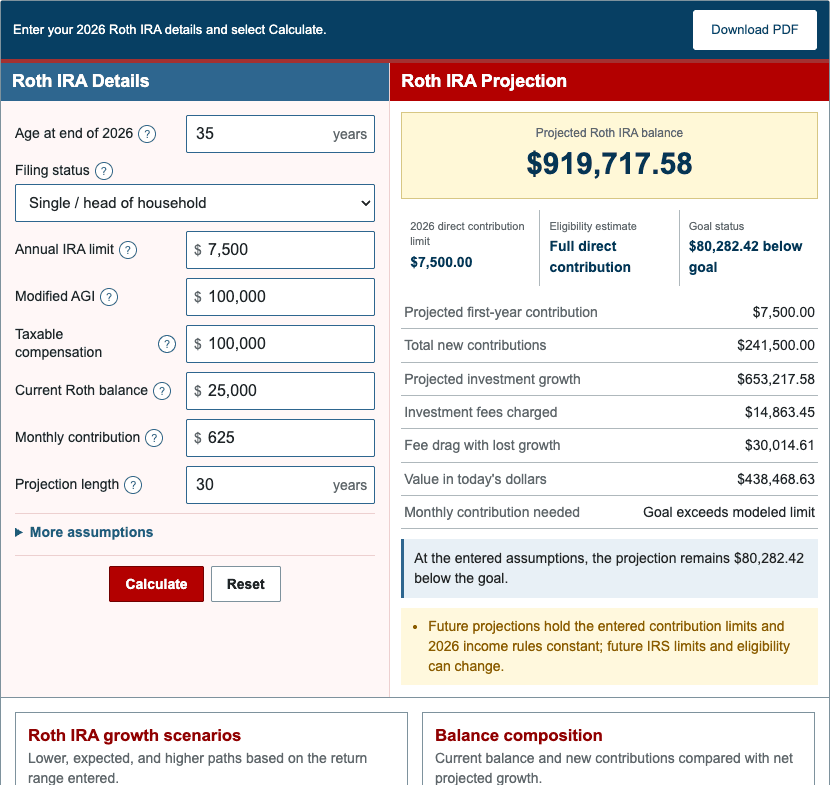
The default scenario uses a 35-year-old single filer with $100,000 of MAGI and compensation, no other IRA contribution, $25,000 already invested, and $625 monthly for 30 years.
| Estimated eligible contribution limit | $7,500.00 |
|---|---|
| Projected first-year contribution | $7,500.00 |
| Ending balance | $919,717.58 |
| New contributions | $241,500.00 |
| Investment growth | $653,217.58 |
| Fee drag | $30,014.61 |
| Value in today's dollars | $438,468.63 |
These values come directly from the production engine and update if the shared defaults change.
Step 5: Compare Scenarios
- Test MAGI near the beginning and end of the applicable phaseout.
- Enter other IRA contributions to see the shared limit.
- Compare age 49 and age 50 with catch-up enabled.
- Reduce the return or increase the fee.
- Compare beginning- and end-of-month deposits.
- Change one assumption at a time so the cause remains clear.
References
- IRS - 2026 IRA contribution limits and Roth IRA phaseouts
- IRS Publication 590-A - Contributions to Individual Retirement Arrangements
- IRS Topic No. 309 - Roth IRA contributions
Review the Roth IRA formulas and worked examples for the exact model.