
How to Use a Mortgage Refinance Calculator
Follow a step-by-step mortgage refinance guide covering loan details, ownership costs, extra payments, results, a worked example, and offer comparison.
How does this guide help you use the Refinance Calculator?
This guide explains which values to enter, how the Refinance Calculator processes them, and how to read the resulting estimate. Follow the sections below to check assumptions, compare realistic scenarios, avoid common input mistakes, and understand when an official source or qualified professional should take priority over a planning result.
A refinance replaces the existing mortgage with a new loan. This guide explains how to prepare the inputs, keep ownership costs and extra payments in the correct comparison, interpret the results, and compare official lender offers.
Use the Refinance Calculator for planning. It does not produce a loan approval, payoff statement, rate quote or Loan Estimate.
Before You Start
Gather information for both loans before calculating. Use the same effective comparison date and a realistic estimate of how long you expect to keep the proposed loan.
- A recent mortgage statement showing unpaid principal and note rate.
- The remaining scheduled term in years and months.
- A current payoff quote if you are close to a potential closing date.
- The proposed note rate, new term, closing costs, lender credits and cash-out amount.
- A comparison horizon based on when you may sell, move or refinance again.
Loan Details
Enter the current mortgage
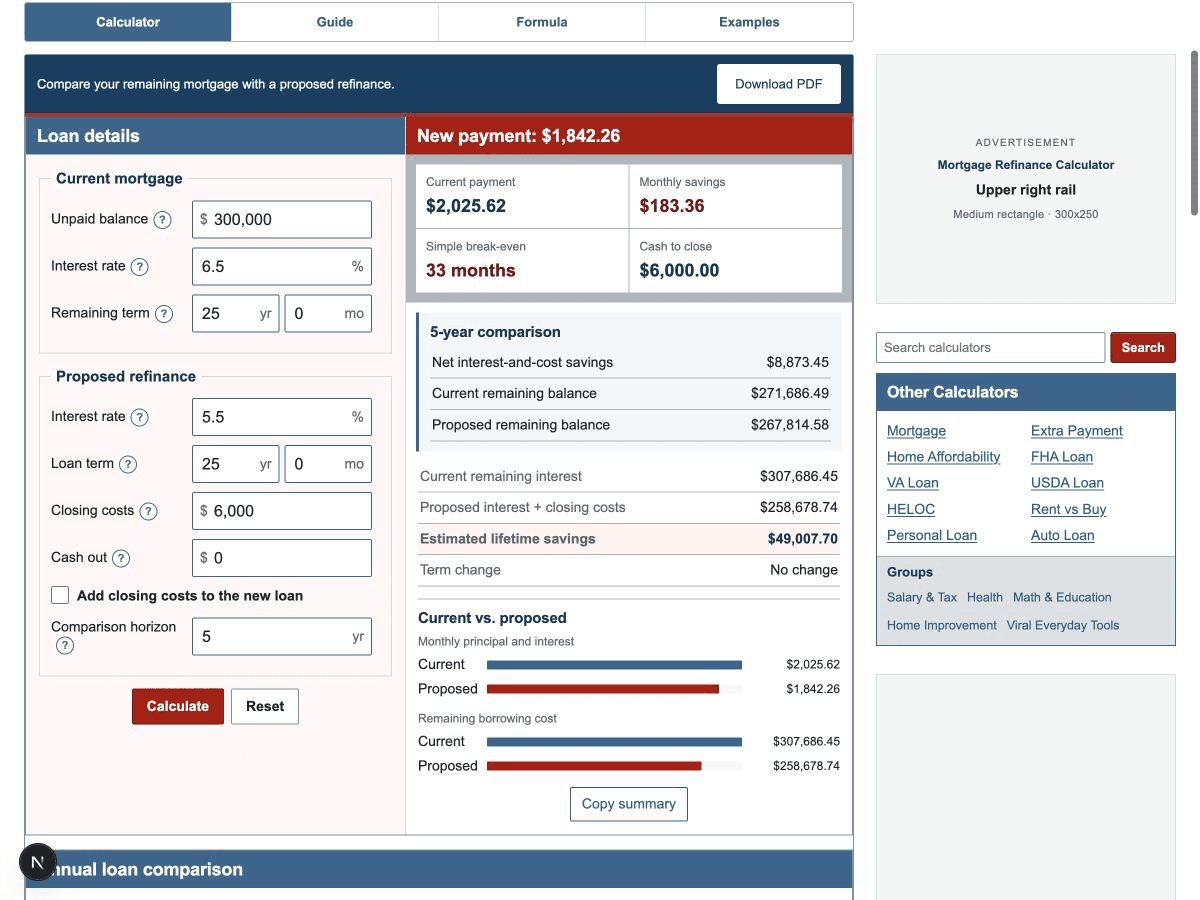
- Current balance: use unpaid principal, excluding escrow and future interest.
- Current interest rate: enter the annual note rate, such as 6.5 for 6.5%.
- Remaining term: enter time still scheduled, not the original loan term.
Enter the proposed refinance
- New interest rate: use the rate associated with the lender scenario being compared.
- New term: enter the full replacement-loan term. A new 30-year term can lower the payment partly by extending repayment.
- Closing costs: include lender and third-party costs, adjusted for any lender credits represented in your comparison.
- Cash out: enter only additional proceeds borrowed above the current balance.
- Finance closing costs: select this when entered costs are added to the proposed balance instead of paid upfront.
Ownership Costs
The refinance engine compares principal, interest and entered closing costs. Property taxes, homeowners insurance, HOA dues, maintenance and utilities are not included because refinancing normally does not change the underlying property and many of these expenses are not controlled by the lender.
Do not assume every ownership cost will remain identical. Compare any change in mortgage insurance, escrow deposits, homeowners insurance or required reserves separately. If you want to model the full housing payment, use the Mortgage Payment Calculator with the current and proposed loan scenarios.
Extra Payments
This refinance comparison assumes both loans follow their scheduled monthly payments. If you currently pay extra principal, comparing the current accelerated schedule with a proposed minimum-payment schedule can overstate refinance savings.
First compare both loans without extra payments. Then use the Extra Payment Calculator to model the same extra-payment plan on each balance, rate and term. If your goal is a shorter payoff, also compare a shorter refinance term with keeping the current mortgage and increasing principal payments.
Confirm with each servicer that additional funds are allowed and applied to principal. A prepayment penalty or a different payment-crediting method can change the practical result.
Read the Results
- Proposed principal: confirm that cash out and financed costs are included exactly once.
- New monthly payment: compare proposed principal and interest with the current scheduled amount.
- Monthly savings: a negative number means the new payment is higher.
- Simple break-even: check how many whole months of positive payment savings recover closing costs.
- Horizon net savings: compare interest and costs over the years you expect to keep the loan.
- Remaining balances: see whether the proposed loan builds equity faster or slower at the same date.
- Lifetime savings: compare current remaining interest with proposed interest plus closing costs.
- Term change: identify whether the refinance extends or shortens repayment.
Worked Example
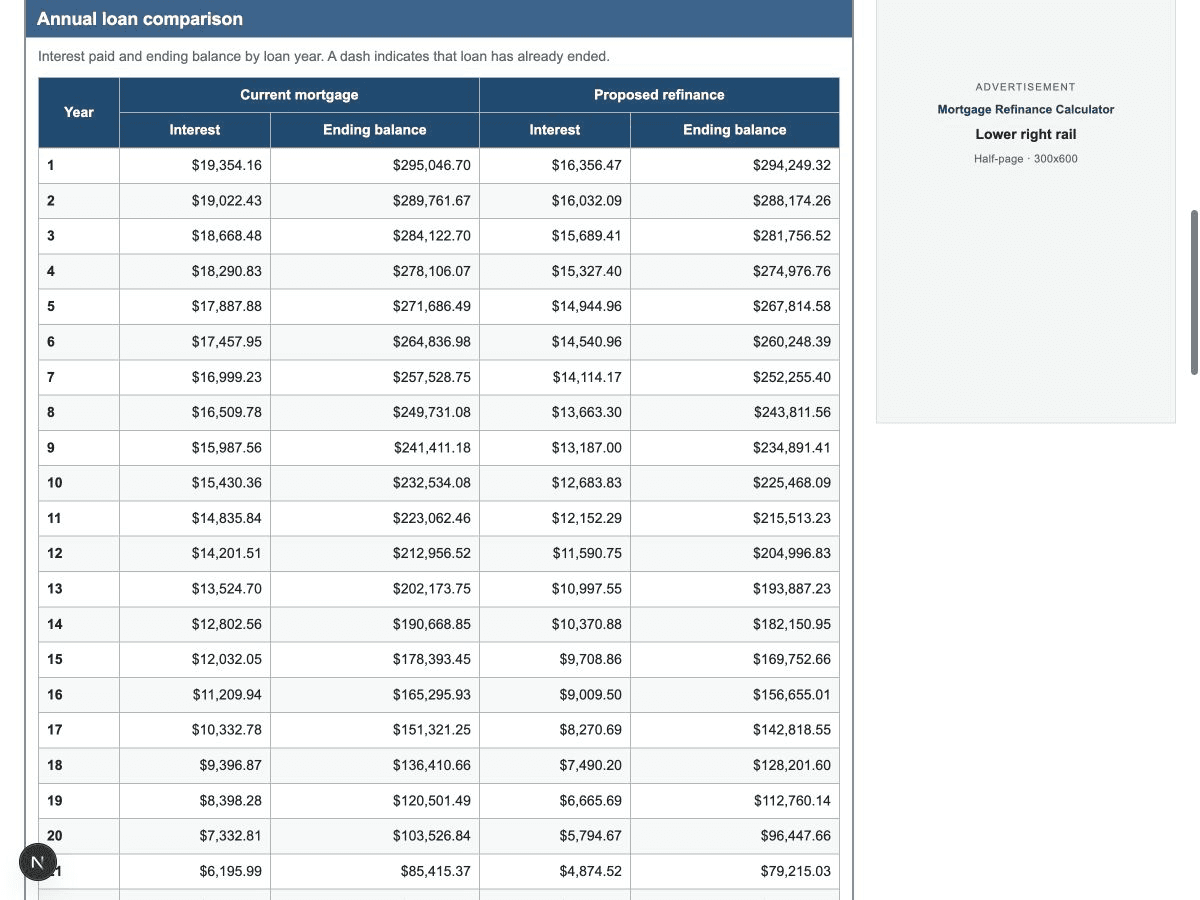
Assume a homeowner owes $300,000 at 6.5% with 25 years remaining. A proposed refinance offers 5.5% for the same 25-year term with $6,000 in upfront closing costs and no cash out.
- The current estimated payment is $2,025.62.
- The proposed estimated payment is $1,842.26.
- Monthly savings are $183.36.
- $6,000 / $183.36 = 32.72, so the simple break-even rounds up to 33 months.
- At five years, modeled net interest-and-cost savings are $8,873.45.
- Estimated lifetime borrowing-cost savings are $49,007.70.
This is the independently checked regression scenario used by the refinance engine. See the three refinance examples for shorter- and longer-term comparisons.
Compare Loans
Request Loan Estimates for the same loan purpose, type, term, rate-lock assumptions and closing date. Run a separate calculator scenario for each offer while keeping the current-loan values and horizon unchanged.
| Comparison item | Why it matters |
|---|---|
| Loan amount | Reveals cash out and financed costs. |
| Note rate and APR | The note rate drives payment math; APR supports broader cost comparison. |
| Monthly principal and interest | Shows the scheduled cash-flow change. |
| Loan costs and lender credits | Determine the cost that must be recovered. |
| Cash to close | Shows immediate funding needs. |
| Five-year comparison | Provides a standardized medium-term disclosure for comparing offers. |
| Mortgage insurance and escrow | Can change the total monthly amount even when principal and interest fall. |
Ask the lender to explain material differences. A refinance advertised as having no closing costs may use a lender credit, a higher rate or a larger balance rather than eliminating the economic cost.