
How to Use the Ovulation Calculator
Learn how to enter cycle dates, cycle length, variation, and luteal-phase timing, then interpret ovulation and fertile-window estimates carefully.
How does this guide help you use the Ovulation Calculator?
This guide explains which values to enter, how the Ovulation Calculator processes them, and how to read the resulting estimate. Follow the sections below to check assumptions, compare realistic scenarios, avoid common input mistakes, and understand when an official source or qualified professional should take priority over a planning result.
This guide explains each input in the Ovulation Calculator and how the results change. The tool performs calendar arithmetic; it does not measure whether or when ovulation occurred.
Before You Start
- Identify the first day of the most recent menstrual period.
- Review several recent cycle lengths if available.
- Estimate how many days those cycles usually differ from the average.
- Use a tracked luteal-phase value only when it comes from an appropriate method or professional guidance.
- Remember that a calendar estimate cannot identify days when pregnancy is impossible.
Step 1: Enter the First Day of the Last Period
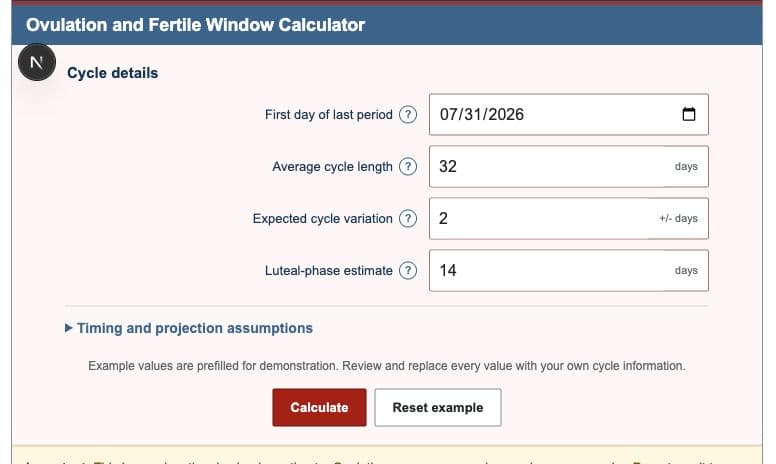
Enter the first calendar day of menstrual bleeding, not the last day and not a day of spotting unless that is how the cycle record was defined. This date becomes cycle day 1 and anchors every result.
Step 2: Enter Average Cycle Length
Cycle length is counted from the first day of one period to the first day of the next. If recent cycles were 30, 32, and 31 days, an average near 31 days is more representative than automatically using 28.
Step 3: Describe Cycle Variation
Enter how many days earlier or later the cycle commonly starts. A value of 2 widens the estimate by two days before and two days after the point ovulation estimate. It does not move the point estimate itself.
Step 4: Review the Luteal-Phase Estimate
The calculator subtracts this value from the expected next-period date. A shorter entered luteal phase moves estimated ovulation later; a longer value moves it earlier. Office on Women's Health notes that the interval from ovulation to the next period can vary, so this input should remain visible.
Step 5: Review Timing and Projection Assumptions
| Input | Purpose | Effect |
|---|---|---|
| Fertile days before | Sets the start of the expected window | More days move the start earlier |
| Fertile days after | Sets the end of the expected window | More days move the end later |
| Pregnancy test delay | Creates an optional planning date | Does not determine test accuracy |
| Pregnancy duration | Creates a possible due date | Applies only if conception occurs near the estimate |
| Cycles to project | Controls future-cycle rows | Repeats the same assumptions |
Step 6: Read the Results
- Estimated ovulation: the point date from cycle length minus luteal-phase length.
- Expected fertile window: the inclusive range created from the entered days before and after ovulation.
- Wider planning range: the fertile window widened by cycle variation.
- Estimated cycle day: the numbered day counted from the entered period start.
- Next expected period: last-period date plus average cycle length.
- Possible test and due dates: optional planning dates based on user-entered delays.
Step 7: Use the Calendar, Timeline, and Projection Table
The calendar distinguishes the point ovulation estimate, expected fertile window, and wider planning range. The cycle timeline places the same dates on cycle-day positions. The future table repeats the model for the selected number of cycles. Equivalent text and table values remain available without relying on color.
Worked Example: 32-Day Cycle with Variation
Enter July 31, 2026, a 32-day cycle, +/- 2 days of variation, and a 14-day luteal phase.
| Estimated ovulation | August 18, 2026 |
|---|---|
| Estimated cycle day | Day 19 |
| Expected fertile window | August 13, 2026 to August 19, 2026 |
| Wider planning range | August 11, 2026 to August 21, 2026 |
| Next expected period | September 1, 2026 |
Limitations and Health Context
- Calendar timing cannot confirm that ovulation happened.
- Future cycles may not match the entered average.
- Hormonal contraception, breastfeeding, perimenopause, illness, and some health conditions can change or suppress ovulation.
- The possible test date does not model product sensitivity or implantation timing.
- The possible due date is not a pregnancy confirmation or clinical estimate.
- Do not use the calculator as birth control.
References
- Office on Women's Health - Ovulation Calculator
- Office on Women's Health - Trying to Conceive
- ACOG - Fertility Awareness-Based Methods
- ACOG - Fertile Window and Conception Timing
Return to the Ovulation Calculator or compare the three worked cycle examples.