
How to Use an Overtime Calculator
Follow a step-by-step overtime calculator guide for base rates, hours, thresholds, time and a half, double time, premium pay, and annual projections.
How does this guide help you use the Overtime Calculator?
This guide explains which values to enter, how the Overtime Calculator processes them, and how to read the resulting estimate. Follow the sections below to check assumptions, compare realistic scenarios, avoid common input mistakes, and understand when an official source or qualified professional should take priority over a planning result.
This guide explains each field in the Overtime Calculator and shows how regular, overtime, double-time, premium, and projected annual gross pay are calculated.
The thresholds and multipliers are planning inputs. The calculator does not determine which law, agreement, classification, or regular-rate calculation applies.
Before You Start
Use hours from one consistent work period. Gather the straight-time hourly rate, total hours worked, applicable threshold and multiplier, any second premium tier, other earnings, and the number of comparable periods used for an annual projection.
- Base hourly rate and currency
- Total hours worked in the period
- Overtime threshold and multiplier
- Optional double-time threshold and multiplier
- Other gross earnings
- Comparable periods per year
Step 1: Enter the Base Rate and Total Hours
Select the currency and enter the straight-time hourly amount used in the scenario. Enter all hours from the same work period.
Do not combine unrelated weeks simply because they appear on one paycheck. Federal FLSA overtime for covered nonexempt employees is generally evaluated by workweek and does not permit averaging hours over two or more weeks.
Step 2: Enter the Overtime Tier
Enter the point where overtime begins and the multiplier applied to hours above that point. A multiplier of 1.5 means the overtime-tier hourly amount is 150% of the entered base rate.
The calculator assigns hours up to the threshold to regular pay and places only excess hours in the overtime tier.
Step 3: Configure Double Time When Applicable
Enable double time only when a second tier belongs in the scenario. Enter a threshold greater than the overtime threshold and the appropriate multiplier.
Hours above the double-time threshold leave the overtime tier and enter the double-time tier, so no hour is counted twice.
Step 4: Add Other Earnings and Projection Periods
Other earnings are added once to the work-period gross amount. The calculator does not decide whether a bonus, differential, or other payment changes a legally defined regular rate.
Periods per year repeats the complete work-period result. Use 52 only when the entered period represents a week and the same earnings are a reasonable annual planning assumption.
Step 5: Read the Results
- Gross pay: regular, overtime, double-time, and other earnings before deductions.
- Premium pay: only the amount above straight-time pay created by the multipliers.
- Effective hourly amount: gross pay divided by total entered hours.
- Projected annual gross: period gross multiplied by entered periods per year.
- Tier breakdown: hours, rates, and pay for each active tier.
- Chart and table: visual and text alternatives that reconcile the pay components.
Worked Example: $22 per Hour for 50 Hours
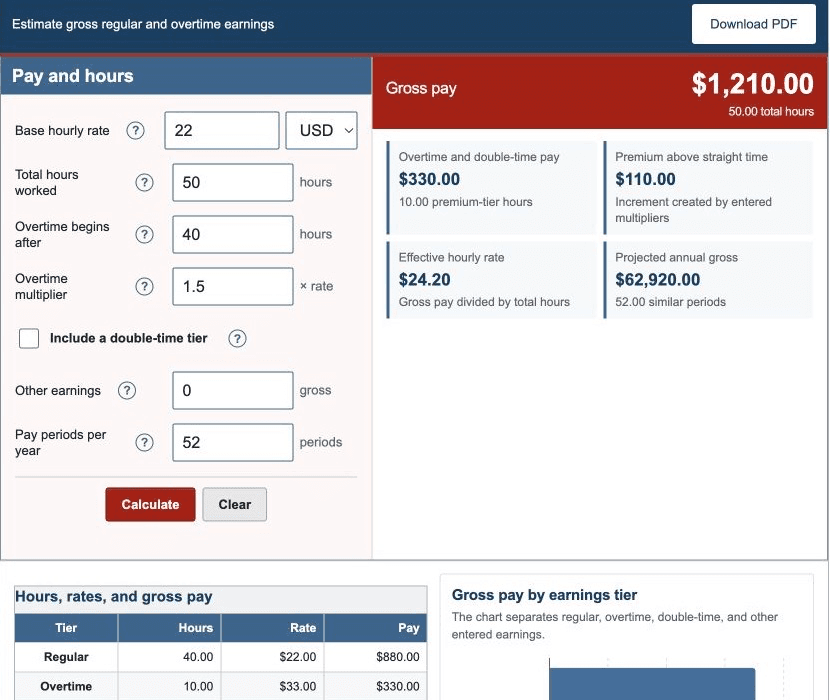
The default uses $22 per hour, 50 total hours, overtime after 40 hours at 1.5, no double time, no other earnings, and 52 comparable periods.
| Regular hours and pay | 40.00 hours, $880.00 |
|---|---|
| Overtime hours and pay | 10.00 hours, $330.00 |
| Gross pay | $1,210.00 |
| Premium above straight time | $110.00 |
| Effective hourly amount | $24.20 |
| Projected annual gross | $62,920.00 |
These figures are generated by the same production engine as the calculator.
Step 6: Check a Pay Statement
- Confirm the workweek or other period used.
- Reconcile total hours with time records.
- Compare each regular, overtime, and double-time tier.
- Check bonuses, differentials, and other earnings separately.
- Remember that gross pay differs from take-home pay after taxes and deductions.
If the statement uses multiple rates or additional compensation, the legal regular-rate calculation may be more complex than this single-rate model.
References
- U.S. Department of Labor - Fact Sheet #23: Overtime Pay Requirements of the FLSA
- U.S. Department of Labor - Regular Rate Under the FLSA
Review the overtime formulas and worked overtime examples for the exact arithmetic.