
How to Use the Ideal Weight Calculator
Learn how to enter height and weight, compare four ideal body weight formulas, use an editable BMI range, and interpret results responsibly.
How does this guide help you use the Ideal Weight Calculator?
This guide explains which values to enter, how the Ideal Weight Calculator processes them, and how to read the resulting estimate. Follow the sections below to check assumptions, compare realistic scenarios, avoid common input mistakes, and understand when an official source or qualified professional should take priority over a planning result.
This guide explains how to use the Ideal Weight Calculator as a formula comparison. The result is a height-based reference estimate, not a diagnosis or a required body weight.
Before You Start
- Use current height and current body weight.
- Remember that the published equations are limited to heights of at least 5 feet.
- Choose a formula because you want to reproduce or compare it, not because one method guarantees a personal target.
- Keep BMI assumptions visible if you change them.
- Do not use this tool for pediatric, pregnancy, medication-dosing, or treatment decisions.
Step 1: Choose U.S. or Metric Units
Select U.S. units for feet, inches, and pounds or metric units for centimeters and kilograms. Changing the unit system changes the entry and display format, not the underlying formulas. The engine normalizes height and weight before calculation.
Step 2: Choose the Published Formula Term
The four equations use separate male and female coefficient sets. Select the term required by the published equation you want to calculate. The input does not account for every difference in body composition, age, identity, health history, or individual goals.
Step 3: Enter Current Height and Weight
Height determines every formula and BMI-based result. Current weight is used only for current BMI and the difference from the selected estimate. It does not change the Devine, Robinson, Miller, or Hamwi values.
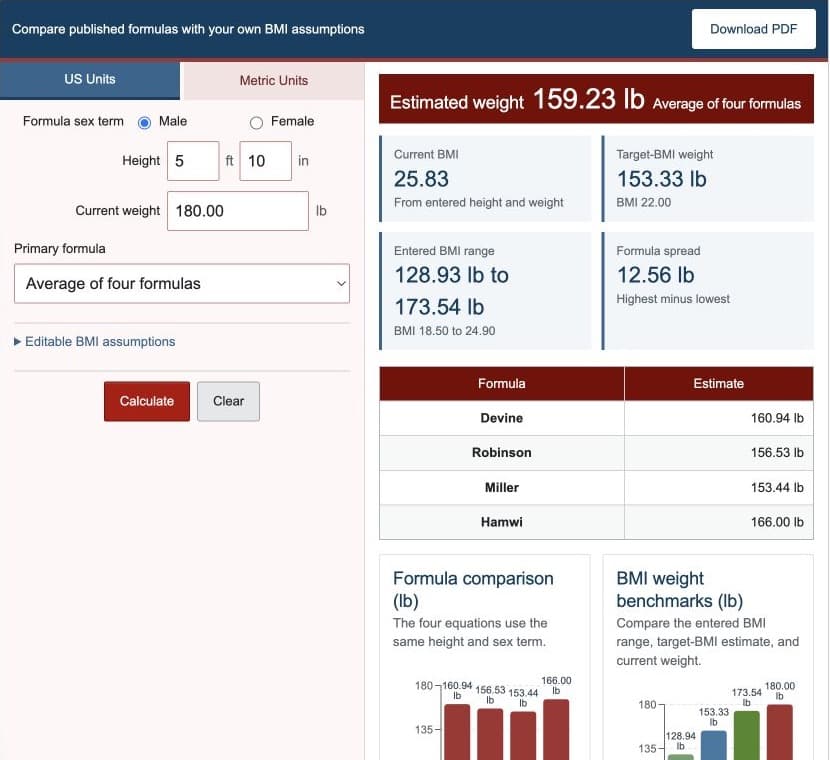
Step 4: Choose an Ideal Weight Formula
| Selection | What it returns | How to use it |
|---|---|---|
| Devine | Devine height-based estimate | Reproduce that named equation |
| Robinson | Robinson height-based estimate | Compare its different base and increment |
| Miller | Miller height-based estimate | Compare its smaller per-inch increment |
| Hamwi | Hamwi pound-based estimate converted for display | Compare the older rule of thumb |
| Average | Arithmetic mean of all four estimates | Summarize the four results without creating a new clinical equation |
Step 5: Review the BMI Assumptions
The target BMI controls one separate target-BMI weight. The lower and upper values control the displayed BMI-based weight range. The initial adult values are editable assumptions, not hidden recommendations.
Step 6: Read the Results
- Selected formula estimate: the named equation or four-formula average.
- BMI-based range: the entered lower and upper BMI values converted to weights.
- Target-BMI weight: the entered target BMI converted to weight.
- Current BMI: current weight divided by height in meters squared.
- Difference from estimate: current weight minus the selected formula estimate.
- Formula spread: highest equation estimate minus the lowest.
A positive difference means current weight is above the selected formula value. A negative difference means it is below. Neither sign is a diagnosis.
Step 7: Use the Charts and Text Alternatives
The formula chart compares all four equation estimates. The outcome-alignment chart places current weight, the selected formula, target-BMI weight, and BMI boundaries on the same weight scale. Read the adjacent tables for exact values and a nonvisual alternative.
Worked Example: 5 Feet 10 Inches
An adult selects the male formula term, enters 5 feet 10 inches and 180 pounds, chooses the four-formula average, and keeps target BMI 22 with boundaries 18.5 and 24.9.
| Metric height | 177.80 cm |
|---|---|
| Metric weight | 81.65 kg |
| Four-formula average | 72.22 kg |
| Target-BMI weight | 69.55 kg |
| BMI-based range | 58.48 to 78.72 kg |
| Formula spread | 5.70 kg |
These outputs demonstrate the calculator. They are not personal weight recommendations.
Limitations and Responsible Interpretation
- Height-only equations do not measure body composition, frame size, fitness, or health.
- BMI is a screening measure and does not directly measure body fat.
- The formulas use binary coefficient sets from their published methods.
- The calculator excludes heights below 5 feet because the formulas are defined using increments above that height.
- The result is unsuitable for medication dosing or individualized treatment.
References
- Clinical Nutrition ESPEN - Ideal body weight: a commentary
- American Journal of Hospital Pharmacy - Determination of ideal body weight for drug dosage calculations
- CDC - Adult BMI Categories
- NIDDK - Am I at a Healthy Weight?
Return to the Ideal Weight Calculator or compare the three worked examples.