
How to Use the Heart Rate Zone Calculator
Use age, height, and weight to estimate maximum, resting, walking, running, and five-zone heart-rate ranges, then interpret them safely.
How does this guide help you use the Heart Rate Zone Calculator?
This guide explains which values to enter, how the Heart Rate Zone Calculator processes them, and how to read the resulting estimate. Follow the sections below to check assumptions, compare realistic scenarios, avoid common input mistakes, and understand when an official source or qualified professional should take priority over a planning result.
Before You Start
Have your age in completed years available. Height and weight are optional to the heart-rate formula but required by this calculator for the separate BMI context metric. Use a resting pulse measured while calm and awake only for comparison with the displayed general reference.
1. Enter Your Age
Age is the only input used to calculate estimated maximum heart rate and the percentage-based activity ranges. Enter a whole number from 18 through 100.
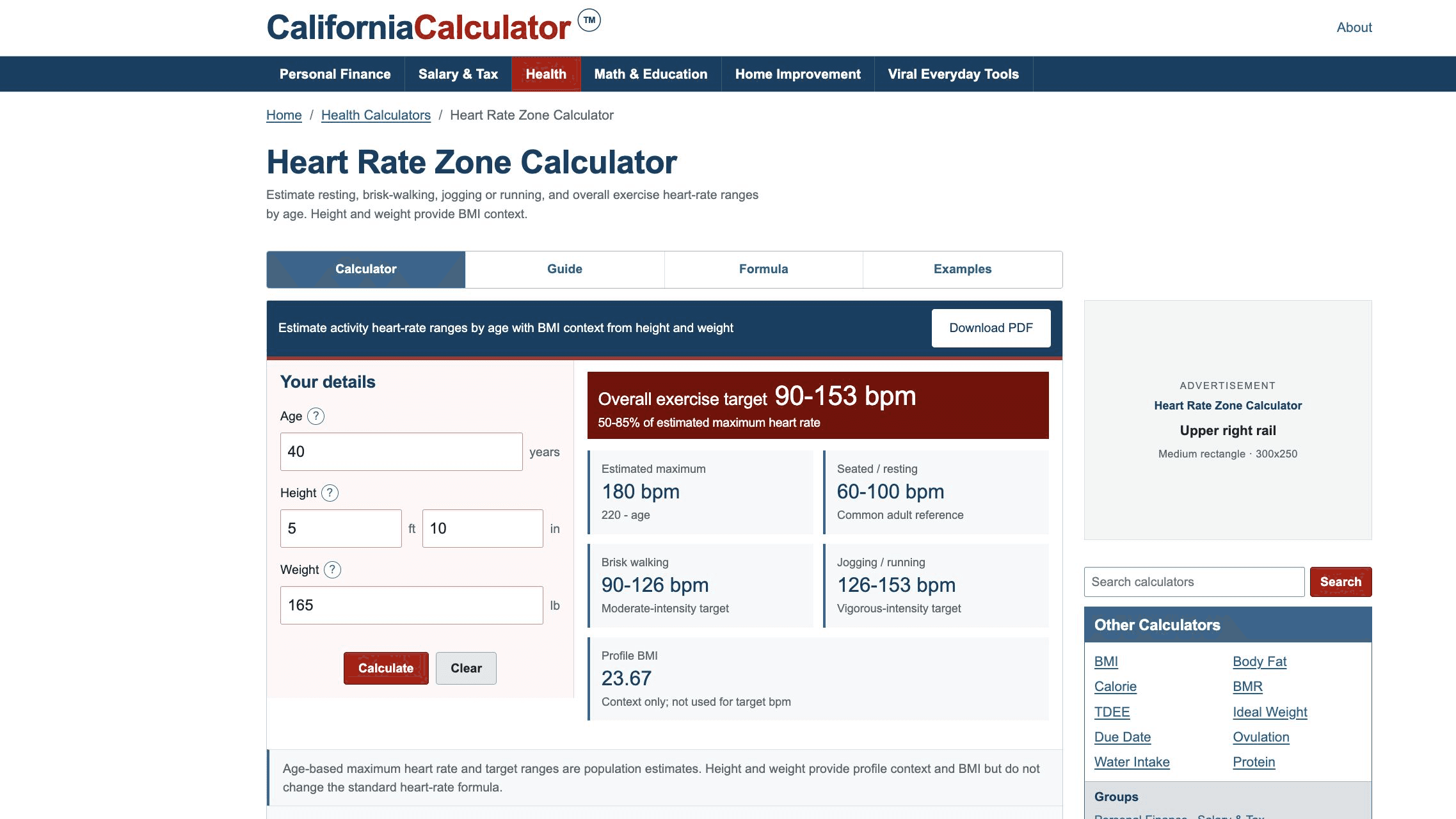
The input panel and results remain side by side on wider screens and stack on smaller screens.
2. Add Height and Weight for Profile Context
Enter height in feet and inches and weight in pounds. The calculator converts these values and displays BMI. Changing height or weight changes BMI only; it does not alter maximum heart rate or the activity ranges.
3. Read the Results in Order
- Estimated maximum: the 220-minus-age population estimate.
- Seated or resting: the general adult 60-100 bpm reference, not a workout target.
- Brisk walking: the 50-70% moderate-intensity band.
- Jogging or running: the 70-85% vigorous-intensity band.
- Overall exercise target: the combined 50-85% range.
- Profile BMI: separate body-size context that does not drive the bpm values.
4. Use the Activity Range Chart
The chart draws every range on the same bpm scale. Compare the left and right endpoints rather than the bar length alone. A hidden accessible table supplies the same labels and values to assistive technology, and the PDF captures the result values and assumptions.
Worked Example: Age 50
For age 50, height 5 ft 10 in, and weight 165 lb, the engine produces the following results:
| Output | Result |
|---|---|
| Estimated maximum | 170 bpm |
| Brisk walking | 85-119 bpm |
| Jogging or running | 119-145 bpm |
| Overall exercise | 85-145 bpm |
| BMI context | 23.67 |
View additional ages on the heart rate examples page.
5. Interpret the Estimate Safely
The American Heart Association describes these figures as averages and a general guide. Use perceived effort as a second signal. The CDC talk test says moderate activity usually permits talking but not singing, while vigorous activity generally limits speech to a few words before a breath.
Stop exercising and seek appropriate medical help for warning symptoms such as chest pain, fainting, severe shortness of breath, or a new irregular heartbeat.
Common Mistakes to Avoid
- Treating estimated maximum heart rate as a measured personal maximum.
- Using the resting reference as an exercise target.
- Assuming every brisk walk or run produces the same intensity for every person.
- Ignoring medicines, heat, illness, dehydration, altitude, or device error.
- Believing height, weight, or BMI modifies this standard age-based formula.
The calculator follows the American Heart Association target-heart-rate chart and uses CDC activity examples and the talk test for interpretation. The formula page documents each equation.
Corrections and Review
Report an issue or error in the calculator using the Contact Us page.