
How to Calculate Net Pay From Gross Pay
Use this step-by-step gross-to-net guide to enter gross pay, withholding rates, pre-tax and post-tax deductions, and interpret take-home pay.
How does this guide help you use the Gross to Net Calculator?
This guide explains which values to enter, how the Gross to Net Calculator processes them, and how to read the resulting estimate. Follow the sections below to check assumptions, compare realistic scenarios, avoid common input mistakes, and understand when an official source or qualified professional should take priority over a planning result.
This guide explains how to turn one gross payment into an educational net-pay estimate. The Gross to Net Calculator uses only the rates and deductions you enter.
Official federal withholding uses current Form W-4 information and IRS methods. State, local, benefit, and payroll-tax rules may use different wage bases.
Before You Start
Gather one pay stub, job-offer estimate, or planning scenario. Keep gross pay, deductions, and rates in the same pay period.
- Gross pay before entered deductions
- Pre-tax deduction amount
- Federal, state and local, payroll, and other percentage assumptions
- Post-tax deduction amount
- Comparable pay periods per year
Step 1: Enter Gross Pay
Enter compensation before the deductions modeled here. Use one weekly, biweekly, semi-monthly, monthly, or other recurring period. Select the display currency, which formats the results but does not perform exchange-rate conversion.
Step 2: Enter Pre-Tax Deductions
Enter a fixed amount to remove before the calculator applies percentage rates. Confirm whether a benefit is excluded from a particular wage base; not every deduction reduces every tax in actual payroll.
Step 3: Enter Withholding Rates
Enter federal, combined state and local, payroll-tax, and other percentages. The tool applies each rate to the same simplified taxable-pay base.
Step 4: Enter Post-Tax Deductions
Enter fixed deductions removed after percentage withholding, such as a deduction that does not reduce the modeled taxable-pay base. Check the actual pay stub or plan document for classification.
Step 5: Enter Pay Periods Per Year
Use 52 for weekly, 26 for biweekly, 24 for semi-monthly, or 12 for monthly pay when the entered period is representative. Annual projections simply multiply the period result, so unusual payments should not be repeated unless they recur.
Step 6: Read the Results
- Net pay: gross pay remaining after all entered deductions.
- Taxable pay used: gross pay minus the entered pre-tax deduction.
- Total entered withholding: the sum of four percentage calculations.
- Total deductions: pre-tax, percentage-based, and post-tax amounts combined.
- Take-home rate: net pay divided by gross pay.
- Annual net projection: net pay multiplied by entered periods.
Worked Biweekly Example
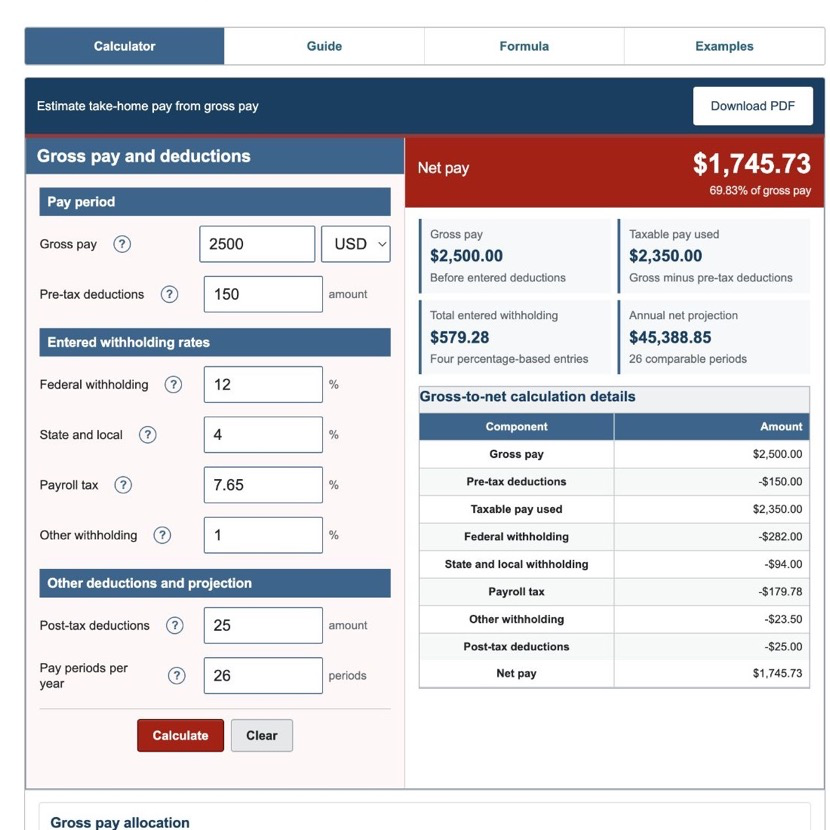
The default scenario uses $2,500 gross pay, $150 pre-tax deductions, rates of 12%, 4%, 7.65%, and 1%, a $25 post-tax deduction, and 26 periods.
| Taxable pay used | $2,350.00 |
|---|---|
| Total entered withholding | $579.28 |
| Total deductions | $754.28 |
| Net pay | $1,745.73 |
| Annual gross projection | $65,000.00 |
| Annual net projection | $45,388.85 |
These values come from the same production engine used on the calculator page.
Step 7: Reconcile a Pay Stub
- Confirm gross pay and pay-period dates.
- Match each deduction to its pre-tax or post-tax treatment.
- Compare each withholding amount separately.
- Confirm total deductions equal the sum of every modeled deduction.
- Verify net pay plus total deductions equals gross pay.
If the estimate differs, official tables, different wage bases, year-to-date values, benefit rules, or employer rounding may explain the gap.
References
- Internal Revenue Service - Publication 15-T (2026), Federal Income Tax Withholding Methods
- Internal Revenue Service - Publication 15 (2026), Employer's Tax Guide
- Internal Revenue Service - Publication 15-B (2026), Employer's Tax Guide to Fringe Benefits
Review the gross-to-net formulas and worked gross-to-net examples for the exact arithmetic used here.