
How to Use a Mortgage Payoff Calculator
Follow a mortgage extra payment guide covering loan details, ownership costs, principal additions, payoff results, a worked example, and loan comparisons.
How does this guide help you use the Mortgage Payoff Calculator?
This guide explains which values to enter, how the Mortgage Payoff Calculator processes them, and how to read the resulting estimate. Follow the sections below to check assumptions, compare realistic scenarios, avoid common input mistakes, and understand when an official source or qualified professional should take priority over a planning result.
Extra principal reduces the balance used to calculate later mortgage interest. This guide explains how to prepare the loan inputs, distinguish mortgage costs from principal payments, enter each extra-payment type, and compare the regular and accelerated schedules.
Use the Mortgage Payoff Calculator for planning. Confirm actual payment-crediting rules and payoff amounts with the mortgage servicer.
Before You Start
Gather current loan information and decide how much cash you can commit without weakening the rest of your financial plan.
- A recent statement showing unpaid principal and the annual note rate.
- The scheduled years and months remaining.
- The month and year when the modeled schedule should begin.
- A realistic monthly, annual, or one-time extra amount.
- Any prepayment penalty identified in the Note, Addendum, or servicer information.
- A target payoff term if you want the calculator to solve a separate monthly-payment goal.
Loan Details
Current balance
Use unpaid principal, not the original loan amount, escrow balance, home value, or a rounded payoff estimate.
Interest rate
Enter the annual fixed note rate. Enter 6.5 for 6.5%. Do not substitute APR in the payment formula.
Remaining term
Enter the time still scheduled on the loan. A mortgage with 25 years remaining should not be entered as a new 30-year term.
Schedule start
Select the first modeled payment month and year so the estimated payoff date and annual comparison rows use meaningful dates.
Ownership Costs
The extra-payment engine models mortgage principal and interest. Property taxes, homeowners insurance, mortgage insurance, HOA dues, maintenance, utilities and escrow deposits are not included because paying extra principal does not automatically remove or change those costs.
Keep the full housing payment in your budget even when the calculator focuses on principal and interest. Use the Mortgage Payment Calculator to estimate ownership costs and the Extra Payment Calculator to test accelerated principal separately.
Extra Payments
Monthly extra principal
Enter an amount that can be sustained with every scheduled payment. It is added each month until the balance reaches zero.
Annual extra principal
Enter an amount expected once every twelve modeled payments. This can represent an annual bonus or other recurring yearly cash source.
One-time lump sum
Enter the amount and the payment number after which it should be applied. The engine applies it once and caps the posting at the remaining balance.
Target payoff
Enter a shorter payoff term to solve the required monthly payment. This target is calculated independently from the planned monthly, annual, and lump-sum strategy.
The calculator permits combining the three planned extra-payment types. Use separate runs when you want a clean comparison between strategies.
Read the Results
- Regular payment: scheduled principal and interest before any extra amount.
- Payment with extra: regular payment plus the recurring monthly extra only.
- Payoff sooner: difference between the regular and accelerated schedule lengths.
- New payoff date: month and year when the accelerated balance reaches zero.
- Interest saved: regular schedule interest minus accelerated schedule interest.
- Total extra principal: extra principal actually applied, after the final-payment cap.
- Net savings after penalty: interest saved minus the penalty entered by the user.
- Target payment: monthly amount required for the separate target payoff term.
Worked Example
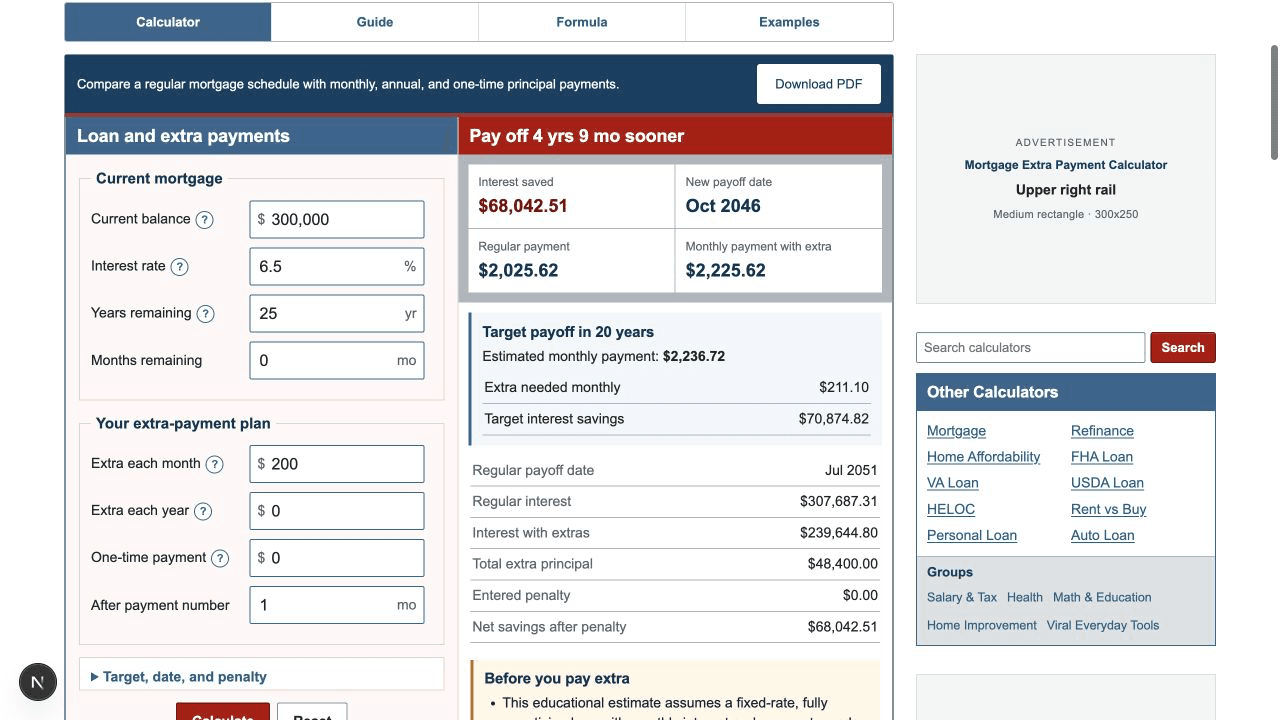
Assume a borrower owes $300,000 at a fixed 6.5% rate with 25 years remaining and adds $200 every month.
- The regular monthly principal-and-interest payment is $2,025.62.
- The planned recurring payment becomes $2,225.62.
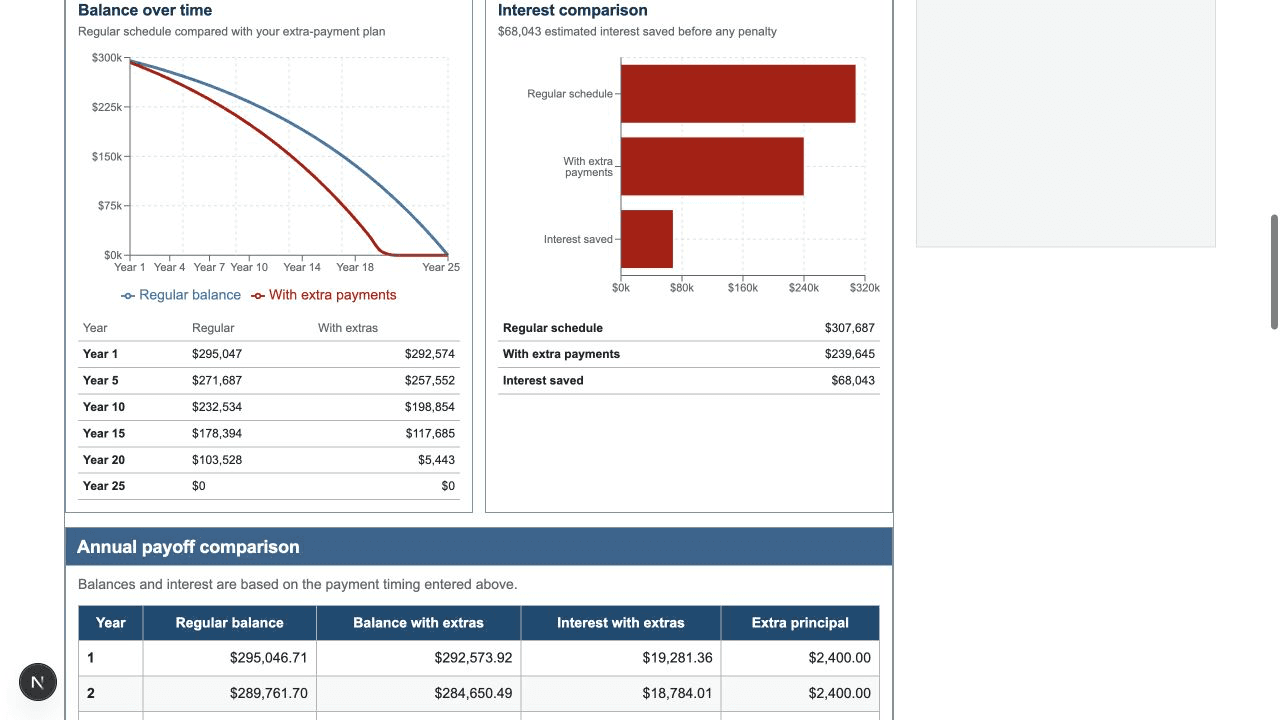
- The regular schedule lasts 300 months.
- The accelerated schedule lasts 243 months.
- The mortgage is paid off 57 months, or 4 years and 9 months, sooner.
- Estimated baseline interest is $307,687.31.
- Estimated accelerated interest is $239,644.80.
- Estimated interest saved is $68,042.51.
This is the regression scenario used by the tested calculation engine. See the three extra payment examples for monthly, annual, and lump-sum comparisons.
Compare Loans
Extra payments are only one path to an earlier payoff. Compare the current loan with a refinance offer when a lower rate or shorter term is available, but keep closing costs and the expected holding period in the decision.
| Comparison | What to review |
|---|---|
| Keep the loan and pay extra | No new closing costs in the model; payment timing and principal application remain important. |
| Refinance to a shorter term | May create a higher required payment, a different rate, and closing costs. |
| Refinance and continue paying extra | Requires two separate comparisons so the new loan and extra-payment effects are not mixed. |
| Make a lump sum and request a recast | A lender-approved recast can change the required payment; this calculator models payoff acceleration, not recasting. |
Use the Refinance Calculator for current-versus-proposed loan costs, then apply the same extra-payment plan to both loan scenarios for a consistent comparison.