
How to Use a Compound Interest Calculator
Follow a step-by-step compound interest calculator guide for principal, contributions, rates, compounding frequency, timing, inflation, and results.
How does this guide help you use the Compound Interest Calculator?
This guide explains which values to enter, how the Compound Interest Calculator processes them, and how to read the resulting estimate. Follow the sections below to check assumptions, compare realistic scenarios, avoid common input mistakes, and understand when an official source or qualified professional should take priority over a planning result.
This guide explains every field in the Compound Interest Calculator and how the inputs work together. Start with values from an account disclosure or a clearly labeled planning scenario.
The result assumes a constant rate. It does not model variable market returns, fees, taxes, withdrawals, or institution-specific daily balance rules.
Before You Start: Gather Consistent Assumptions
- Starting balance: the amount available at the beginning.
- Contribution plan: the amount and frequency you expect to add.
- Time horizon: the number of whole years for the comparison.
- Rate convention: determine whether the quoted figure is a nominal annual rate or an APY.
- Compounding frequency: use the frequency described by the account or scenario.
- Inflation assumption: use it only when you want an estimated purchasing-power comparison.
Step 1: Enter the Starting Balance and Time
Enter the initial investment
Use the balance available before the first modeled contribution. Enter 0 when the plan starts only with future deposits.
Enter the investment length
Choose 1 to 100 whole years. Long projections magnify small differences in rates and assumptions.
Time matters because each completed interval can add interest to the balance used in the next interval. An earlier contribution generally receives more growth periods than a later one.
Step 2: Enter the Rate and Compounding Frequency
Enter 5 for a 5% nominal annual rate. Then choose annual, semiannual, quarterly, monthly, twice-monthly, biweekly, weekly, daily, or continuous compounding.
The calculator converts the nominal rate to an effective annual rate. It then derives an equivalent rate for each contribution interval, allowing the contribution schedule and compounding schedule to differ without mixing incompatible period rates.
Step 3: Set the Contribution Schedule
Enter the amount added at each contribution interval, then choose annual, quarterly, monthly, twice-monthly, biweekly, or weekly contributions.
Choose Beginning of interval if the contribution enters before that interval's interest is applied. Choose End of interval if it enters afterward. A beginning contribution receives one additional interval of growth.
Open More options to enter an annual contribution increase. For example, 3% raises the contribution amount at the start of each modeled year. The increase applies to the deposit stream, not to the interest rate.
Step 4: Add an Inflation Assumption When Needed
The inflation field does not change the nominal future balance. It discounts that balance to estimate purchasing power in today's dollars under a constant inflation assumption.
The Bureau of Labor Statistics explains that price indexes can be used to translate current-dollar amounts into constant dollars. This calculator uses the rate you enter rather than forecasting CPI.
Step 5: Calculate and Read the Results
- Future balance: the projected nominal ending balance.
- Total contributions: the initial investment plus every modeled recurring deposit.
- Interest earned: future balance minus total contributions. A negative assumed rate can make this negative.
- Inflation-adjusted balance: estimated present purchasing power using the entered inflation rate.
- Effective annual rate: the annual growth rate after applying the selected compounding frequency.
- Contribution and interest chart: the share of the positive future balance attributable to deposited money and modeled interest.
- Annual growth schedule: beginning balance, contributions, interest, and ending balance for every year.
Worked Example: $10,000 Plus $100 Monthly
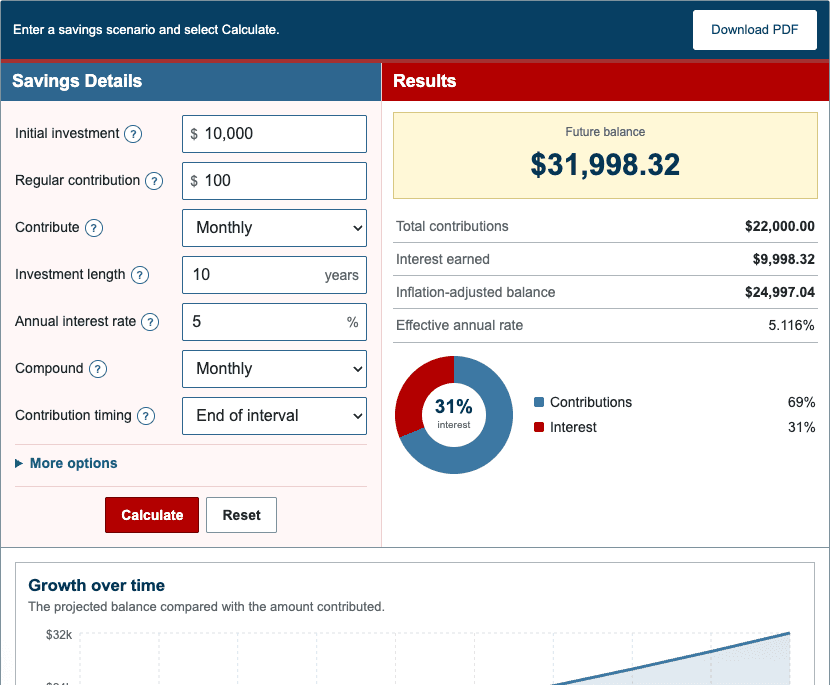
The default scenario starts with $10,000, adds $100 at the end of each month, uses a 5% nominal annual rate compounded monthly, projects 10 years, and applies a 2.5% inflation assumption.
| Initial investment | $10,000.00 |
|---|---|
| Recurring contributions | $12,000.00 |
| Total contributions | $22,000.00 |
| Future balance | $31,998.32 |
| Interest earned | $9,998.32 |
| Inflation-adjusted balance | $24,997.04 |
| Effective annual rate | 5.116% |
The calculation includes 120 end-of-month deposits. The final value is greater than the $22,000 contributed because the starting balance and earlier deposits receive multiple growth intervals.
Step 6: Compare Scenarios Fairly
Change one assumption at a time. First compare monthly contributions while keeping the rate, time, and timing fixed. Next restore the contribution and compare the time horizon. Then test rate or frequency.
Use the nominal balance for the modeled account total and the inflation-adjusted balance for a purchasing-power comparison. For a market investment, test conservative, middle, and optimistic rate assumptions instead of treating one result as certain.
For a calculation built around fees, taxes, and investment returns, use the Investment Calculator. For a retirement-specific savings target and income estimate, use the Retirement Calculator.