
How to Use a Commission Calculator
Follow a step-by-step sales commission calculator guide for eligible sales, flat and tiered rates, base pay, adjustments, and take-home estimates.
How does this guide help you use the Commission Calculator?
This guide explains which values to enter, how the Commission Calculator processes them, and how to read the resulting estimate. Follow the sections below to check assumptions, compare realistic scenarios, avoid common input mistakes, and understand when an official source or qualified professional should take priority over a planning result.
This guide explains every field in the Commission Calculator. It shows how to model flat or marginal tiered sales commission, base pay, adjustments, and a take-home estimate.
The calculator performs plan arithmetic from values you enter. The written commission agreement determines eligible sales, timing, credit, caps, and adjustments.
Before You Start
Gather the plan documents and keep every amount in one currency and pay period.
- Eligible sales or revenue for the period
- Flat rate, or tier thresholds and rates
- Base pay or draw for the same period
- Returns, bonuses, clawbacks, or other adjustments
- Combined withholding assumption and fixed deductions
Step 1: Enter Eligible Sales
Enter only the sales credited under the plan for the modeled period. If the plan pays after collection, subtracts returns, or splits credit among representatives, calculate the eligible amount before entering it.
Enter base pay for the same period. Do not mix annual sales with monthly base pay or weekly deductions.
Step 2: Choose the Commission Structure
Flat rate
Choose Flat rate when one percentage applies to every eligible sales dollar.
Tiered rate
Choose Tiered rate for a marginal three-band plan. Enter the end of the first tier, the first rate, the end of the second tier, the second rate, and the rate above the second threshold.
The calculator applies each rate only to sales inside that band. It does not retroactively apply the top rate to earlier sales.
Step 3: Enter Base Pay and Adjustments
Base pay can represent salary, hourly earnings, or a draw paid for the same period. The calculator adds it to commission but does not treat it as commission.
Use a positive adjustment for an added incentive or a negative adjustment for a clawback. The engine validates that base pay, commission, and adjustment still produce gross pay above zero.
Step 4: Enter Withholding and Fixed Deductions
Enter one combined withholding percentage if you want an educational take-home scenario. Enter fixed deductions as a currency amount. Both apply to gross pay after base pay, commission, and adjustment are combined.
IRS Publication 15 discusses commissions within supplemental-wage withholding guidance. Employer payroll methods and final tax liability can differ from the single percentage entered here.
Step 5: Read the Results
- Commission earned: the flat or tiered calculation before base pay.
- Effective commission rate: total commission divided by eligible sales.
- Gross pay: base pay plus commission plus adjustment.
- Estimated withholding: gross pay multiplied by the entered percentage.
- Total deductions: estimated withholding plus fixed deductions.
- Take-home estimate: gross pay minus total deductions.
Worked Example: 5% Flat Commission
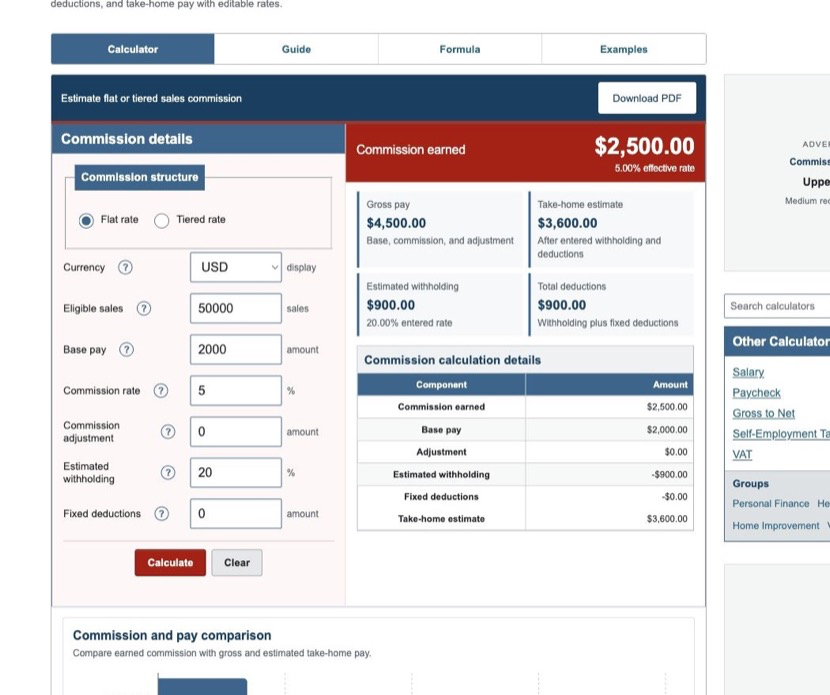
The default scenario uses $50,000 of eligible sales, a 5% flat rate, $2,000 of base pay, no adjustment, 20% entered withholding, and no fixed deductions.
| Commission earned | $2,500.00 |
|---|---|
| Effective commission rate | 5.00% |
| Gross pay | $4,500.00 |
| Estimated withholding | $900.00 |
| Total deductions | $900.00 |
| Take-home estimate | $3,600.00 |
These values are generated by the same production engine used on the calculator page.
Step 6: Reconcile the Commission Statement
- Confirm eligible sales and the date they became commissionable.
- Calculate each tier separately and add the bands.
- Check base pay, draw treatment, bonuses, returns, splits, and clawbacks.
- Confirm base pay plus commission plus adjustment equals gross pay.
- Compare payroll deductions separately from commission-plan arithmetic.
Commissioned employees may also have overtime or exemption considerations. The calculator does not determine coverage or compliance.
References
- Internal Revenue Service - Publication 15 (2026), Employer's Tax Guide
- U.S. Department of Labor - Fact Sheet #20: Commissioned Retail Employees
- U.S. Department of Labor - Fact Sheet #23: Overtime Pay Requirements
Review the commission formulas and worked commission examples for the exact arithmetic used here.