
How to Use the US Income Tax Calculator
Follow a step-by-step US income tax guide for filing status, wages, business and investment income, deductions, credits, withholding, and tax results.
How does this guide help you use the US Income Tax Calculator?
This guide explains which values to enter, how the US Income Tax Calculator processes them, and how to read the resulting estimate. Follow the sections below to check assumptions, compare realistic scenarios, avoid common input mistakes, and understand when an official source or qualified professional should take priority over a planning result.
This guide explains how to enter one consistent federal tax scenario in the US Income Tax Calculator. Gather records first, enter only supported amounts, and review the federal and optional state/local results separately.
Before You Start
Gather the records that match the tax year being modeled. Useful documents can include Forms W-2, 1099-INT, 1099-DIV, SSA-1099, business records, estimated-payment confirmations, mortgage-interest records, charitable receipts, and education or dependent-care expenses.
- Filing status and dependent counts
- Each spouse's age, wages, withholding, and estimated payments
- Business, investment, Social Security, passive, and other income
- Potential adjustments, deductions, and credits
- Any optional state and local effective-rate assumption
Step 1: Enter the Tax Year and Filing Status
Enter a supported tax year and choose the federal filing status expected on the return. Filing status changes bracket widths, the standard deduction, capital-gain thresholds, credit phaseouts, and some additional-tax thresholds.
Married filing separately users who enter Social Security benefits must also indicate whether they lived apart from their spouse for the entire year because the modeled taxable-benefit worksheet changes.
Step 2: Enter Income, Withholding, and Payments
Use Form W-2 box 1 for wages and box 5 for Medicare wages. Enter federal, state, and local withholding in their separate fields. Joint filers enter each spouse separately.
Then enter Social Security benefits, tax-exempt interest, taxable interest, ordinary and qualified dividends, passive income, short- and long-term capital gains, and other income. Qualified dividends cannot exceed ordinary dividends.
Step 3: Add Business or Self-Employment Income When Applicable
Select Yes only when net business or self-employment income should be included. The calculator then displays business income, estimated payments, and Medicare-wage fields used by the supported self-employment and Additional Medicare Tax calculations.
On a joint return, each spouse's business income is modeled separately because each spouse generally calculates a separate Schedule SE. W-2 box 1 wages are used as a planning proxy when coordinating the Social Security wage base.
Step 4: Enter Supported Deductions and Credits
Enter only amounts for which eligibility is reasonably expected. The calculator models selected IRA and student-loan adjustments, Schedule 1-A amounts, real-estate tax, mortgage interest, charitable contributions, medical expenses, dependent-care expenses, education expenses, and other entered credits.
The engine compares the modeled standard and itemized deductions and uses the larger result. Medical expenses contribute only above the supported adjusted-gross-income floor, and state and local itemized taxes are subject to the ruleset's modeled cap.
Step 5: Read the Results
- Adjusted gross income: modeled gross income after supported adjustments.
- Taxable income: income remaining after supported deductions.
- Total federal tax: modeled federal income tax plus supported additional taxes after credits.
- State and local estimate: adjusted gross income multiplied by the effective rate entered.
- Refund or amount due: estimated tax compared with entered payments and refundable credits.
- Marginal and effective rates: two different views of the modeled tax burden.
When a state/local rate or withholding is entered, the headline balance is a combined planning result, not the refund shown on a federal Form 1040.
Worked Example: 2026 Single Filer
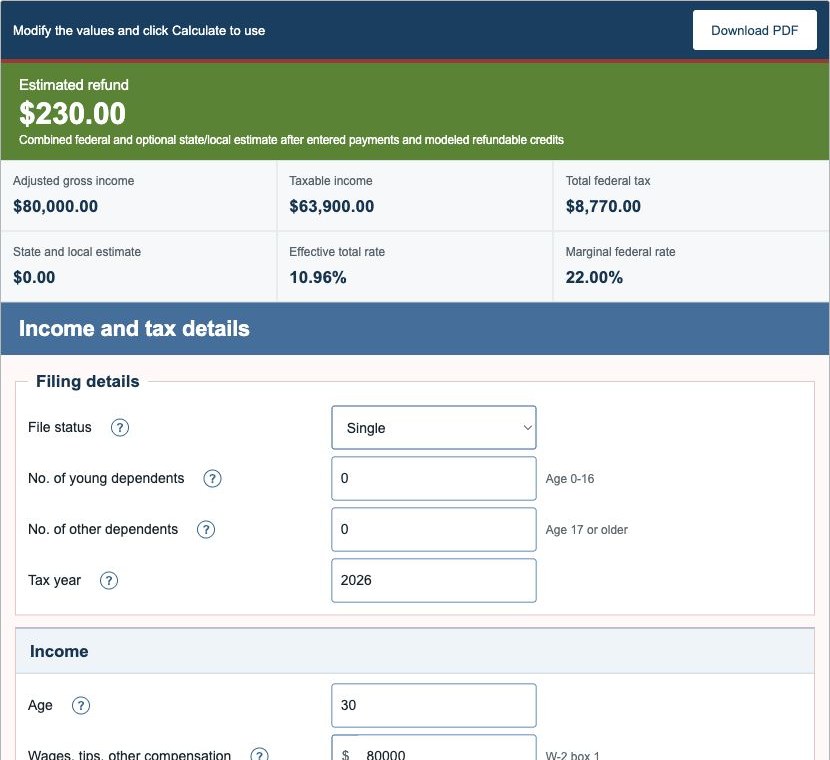
The default scenario uses a single filer, age 30, with $80,000.00 of W-2 wages and $9,000.00 of federal withholding. With no optional state/local rate, the production engine returns:
| Gross income | $80,000.00 |
|---|---|
| Standard deduction | $16,100.00 |
| Taxable income | $63,900.00 |
| Total federal tax | $8,770.00 |
| Federal withholding | $9,000.00 |
| Estimated refund | $230.00 |
The same checked engine values are used on the calculator and Examples pages.
Important Limitations
This calculator does not prepare Form 1040 or model every federal or state rule. It excludes or simplifies items such as alternative minimum tax, qualified business income deduction, earned income credit, marketplace premium tax credit, foreign tax rules, complete capital-loss carryovers, and state-specific returns.
Direct bracket arithmetic can also differ slightly from an IRS tax table used on a filed return. Confirm material decisions with current instructions or a qualified professional.
References
- IRS Revenue Procedure 2025-32: 2026 inflation adjustments
- IRS Revenue Procedure 2024-40: 2025 inflation adjustments
- IRS Publication 505: Tax Withholding and Estimated Tax
- IRS Publication 915: Social Security and Equivalent Railroad Retirement Benefits
Review the US income tax formulas and worked tax examples for the exact modeled sequence.