
How to Use a Bonus Calculator
Follow a step-by-step bonus calculator guide for fixed and percentage bonuses, withholding assumptions, deductions, and take-home bonus results.
How does this guide help you use the Bonus Calculator?
This guide explains which values to enter, how the Bonus Calculator processes them, and how to read the resulting estimate. Follow the sections below to check assumptions, compare realistic scenarios, avoid common input mistakes, and understand when an official source or qualified professional should take priority over a planning result.
This guide explains every field in the Bonus Calculator. It shows how to estimate a fixed or percentage bonus after the withholding rates and deductions you enter.
The calculator does not select a payroll method or tax rate. Treat the result as a transparent scenario, not an employer payroll calculation or final tax estimate.
Before You Start
Gather the gross bonus information and the payroll assumptions that apply to the payment.
- Bonus target percentage and reference earnings, or a fixed gross amount
- Currency used for every amount
- Pre-tax and post-tax deductions that apply to the bonus
- Federal, state and local, payroll-tax, and other withholding percentages
- Employer information about how the bonus will be paid
Step 1: Choose a Bonus Method
Percentage bonus
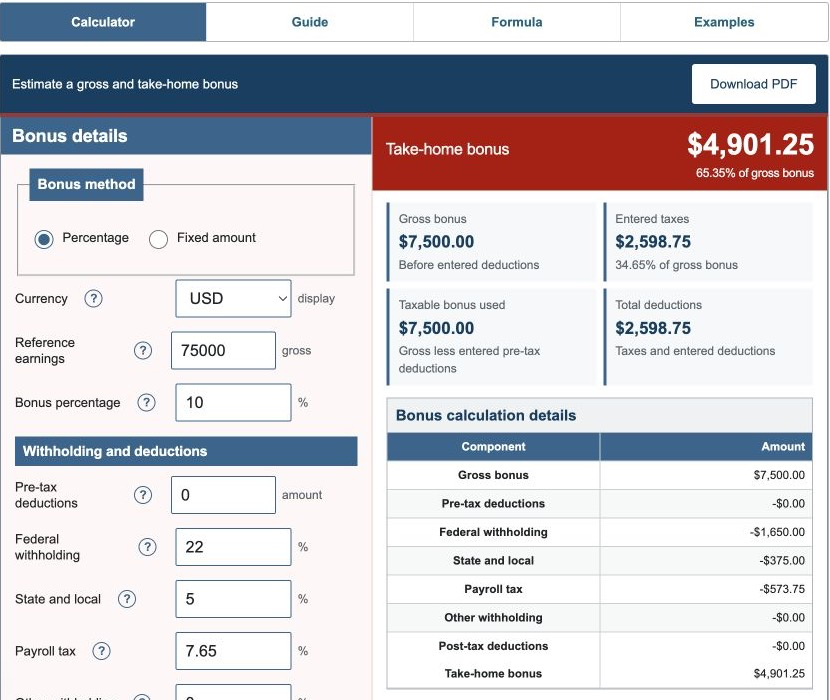
Select Percentage when the award is defined as a share of salary or other reference earnings. Enter the full reference amount and the target percentage. A 10% target on $75,000 produces a $7,500 gross bonus.
Fixed bonus
Select Fixed amount when the employer provides the gross award directly. The calculator uses that entered amount without a percentage conversion.
Step 2: Enter Deductions
Enter a pre-tax deduction only when the modeled payroll treatment removes that amount before the entered percentage calculations. Enter post-tax deductions for fixed amounts removed after the estimated taxes.
Actual benefit and payroll rules determine whether a deduction applies to a bonus and which wage bases it changes. The calculator uses one simplified taxable-bonus amount for all four entered rates.
Step 3: Enter Withholding Assumptions
Enter federal, state and local, payroll-tax, and other percentages separately. The engine applies each rate to the modeled taxable bonus.
IRS Publication 15 explains multiple federal supplemental-wage withholding methods and conditions. A flat percentage entered here is only a scenario. Final income-tax liability depends on the complete return, and state or local treatment varies.
Step 4: Read the Results
- Gross bonus: the fixed award or calculated percentage award before deductions.
- Taxable bonus used: gross bonus minus the entered pre-tax deduction.
- Entered taxes: the four rate-based amounts added together.
- Total deductions: pre-tax deduction, entered taxes, and post-tax deduction.
- Take-home bonus: gross bonus minus total deductions.
- Take-home rate: take-home bonus as a percentage of gross bonus.
- Withholding rate: entered taxes as a percentage of gross bonus.
Worked Example: 10% of $75,000
The default scenario uses $75,000 of reference earnings, a 10% bonus, 22% entered federal withholding, 5% entered state and local withholding, 7.65% entered payroll tax, and no deductions.
| Gross bonus | $7,500.00 |
|---|---|
| Modeled taxable bonus | $7,500.00 |
| Federal withholding estimate | $1,650.00 |
| State and local estimate | $375.00 |
| Payroll-tax estimate | $573.75 |
| Total entered taxes | $2,598.75 |
| Take-home bonus | $4,901.25 |
| Take-home rate | 65.35% |
The 22% value is an example input tied to this scenario, not a recommendation for every bonus.
Step 5: Compare the Estimate With Payroll
- Confirm the gross award and whether it is paid separately from regular wages.
- Compare each tax and deduction line individually.
- Check whether payroll uses different wage bases or year-to-date limits.
- Confirm gross bonus minus total deductions equals the deposited amount.
- Ask payroll about differences before treating the estimate as an error.
Step 6: Check Whether the Bonus Affects Overtime
The Department of Labor explains that some nondiscretionary bonuses are included in the regular rate for covered nonexempt employees, while qualifying discretionary bonuses may be excluded. The name assigned to a bonus does not decide the issue by itself.
This calculator estimates only the bonus payment. Use the Overtime Calculator for a separate hours-and-rate scenario and obtain qualified guidance for legal classification.
References
- Internal Revenue Service - Publication 15 (2026), Employer's Tax Guide
- Internal Revenue Service - Publication 15-T (2026), Federal Income Tax Withholding Methods
- U.S. Department of Labor - Fact Sheet #56C: Bonuses under the FLSA
Review the bonus formulas and worked bonus examples for the exact arithmetic used here.