
How to Use the BMI Calculator
Follow a step-by-step BMI calculator guide for adults, children, and teens, including measurement tips, BMI categories, percentiles, and interpretation.
How does this guide help you use the BMI Calculator?
This guide explains which values to enter, how the BMI Calculator processes them, and how to read the resulting estimate. Follow the sections below to check assumptions, compare realistic scenarios, avoid common input mistakes, and understand when an official source or qualified professional should take priority over a planning result.
This guide explains how to use the BMI Calculator for an adult or a person age 2-19. The arithmetic is simple, but the interpretation changes with age and requires accurate measurements.
Before You Start
Gather current age, height, and weight. For a child or teen, also gather additional completed months and select the sex used by the CDC growth-chart reference.
- Measure height without shoes.
- Use a level floor and a stable scale.
- Keep height and weight in the same selected unit system.
- Do not use adult BMI categories for anyone younger than 20.
Step 1: Enter Age and Sex
Age determines the result model. Age 20 and older uses fixed adult categories. Ages 2-19 use BMI-for-age percentiles, so exact age in years and months and the selected sex affect the reference comparison.
Step 2: Choose U.S. or Metric Units
Select U.S. units for feet, inches, and pounds or metric units for centimeters and kilograms. Changing units converts the current measurements so the underlying physical values remain aligned.
Step 3: Enter Height and Weight
For height, stand straight with heels against a flat surface and eyes looking forward. For weight, use a firm floor and similar clothing conditions when comparing measurements over time.
Step 4: Calculate BMI
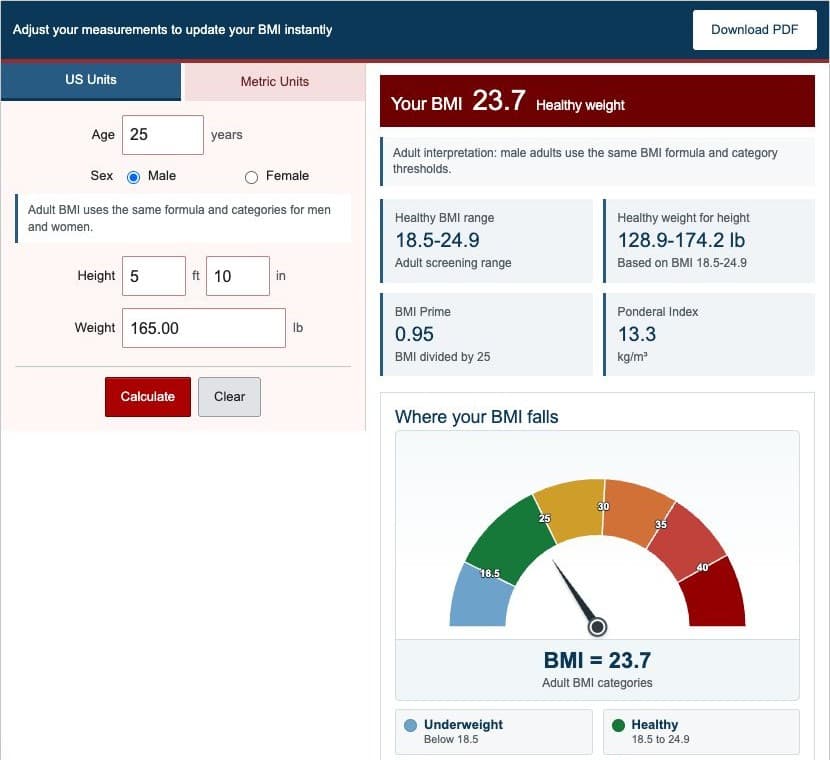
Select Calculate or submit the form from the keyboard. The engine validates the measurements, normalizes units, calculates BMI without intermediate rounding, and selects the result view for the entered age.
Step 5A: Read Adult BMI Results
- BMI: the calculated weight-to-height ratio.
- Category: the fixed CDC adult screening category.
- Gauge: the position of the unrounded BMI across category bands.
- Healthy-weight range: the weights corresponding to BMI 18.5 through the boundary at 25 for the entered height.
- BMI Prime and Ponderal Index: related mathematical context.
Adult sex does not change the BMI formula or category cutoffs.
Step 5B: Read Child and Teen Results
- BMI: calculated from height and weight with the same core formula.
- BMI-for-age percentile: position relative to the CDC reference for the same age and sex.
- Category: underweight, healthy weight, overweight, obesity, or severe obesity based on CDC definitions.
- Percent of P95: BMI as a percentage of the age- and sex-specific 95th-percentile BMI.
Discuss pediatric results with a qualified healthcare professional, especially when the result or growth pattern causes concern.
Worked Example: Adult Metric BMI
An adult who is 1.80 meters tall and weighs 75 kilograms has BMI 23.1.
| Age | 30 years |
|---|---|
| Height | 180 cm |
| Weight | 75 kg |
| BMI | 23.1 |
| Adult category | Healthy weight |
| Healthy-weight screening range | 59.9-81.0 kg |
This example is generated by the same tested engine as the live calculator.
Step 6: Interpret the Result Responsibly
BMI is a screening measure, not a direct measure of body fat or a diagnosis. Muscle mass, pregnancy, age, body composition, growth history, medications, and other health information may change how a result should be understood.
Use the result to support a more complete discussion, not as the sole basis for treatment, dieting, or conclusions about health.
Review the BMI formulas and worked BMI examples for the exact calculations.
Corrections and Review
Report an issue or error in the calculator using the Contact Us page.