
How to Use an Auto Loan Calculator
Follow a step-by-step auto loan calculator guide for vehicle price, monthly payment, trade-in equity, sales tax, fees, interest, and total cost.
How does this guide help you use the Auto Loan Calculator?
This guide explains which values to enter, how the Auto Loan Calculator processes them, and how to read the resulting estimate. Follow the sections below to check assumptions, compare realistic scenarios, avoid common input mistakes, and understand when an official source or qualified professional should take priority over a planning result.
This guide explains each field in the Auto Loan Calculator, including positive and negative trade-in equity, estimated sales tax, entered fees, and the difference between paying costs upfront and financing them.
Use the result as a planning estimate. Vehicle tax rules and fees vary, and the signed purchase and credit documents control the transaction.
Before You Start: Gather Written Numbers
Collect the following before you calculate:
- Out-the-door price: ask for the complete price including taxes and fees in writing.
- Vehicle price: identify the negotiated price before the calculator applies the listed adjustments.
- Rate and term: use the annual note rate and number of monthly payments in the offer.
- Cash incentive: enter a rebate or discount separately so its effect remains visible.
- Trade-in details: use the offered trade value and a current payoff amount from the existing lender.
- Taxes and fees: enter the applicable vehicle rate and itemized title, registration, documentation, or other charges.
Step 1: Enter the Vehicle and Loan Details
Choose Total Price mode
Use this mode when you know the vehicle price and want to estimate the monthly payment.
Enter the auto price
Use the negotiated vehicle price, then enter incentives separately. Do not subtract the down payment or trade-in yourself.
Enter the loan term
Use the exact number of months, such as 48, 60, or 72. A longer term changes both the payment and total interest.
Enter the annual interest rate
Enter 5 for a 5% annual rate. Compare the calculator with the APR and finance charge in the offer.
Add the incentive and down payment
Both reduce the modeled amount financed. The down payment also contributes to the displayed upfront amount.
Step 2: Add Trade-in Equity, Sales Tax, and Fees
Enter the trade-in value and the amount still owed. The calculator uses trade-in equity = trade value - amount owed. Positive equity reduces the amount financed. Negative equity increases it.
Next, enter the vehicle sales-tax rate and fees. Select Include taxes and fees in the loan when the written offer finances those costs. Leave it unselected when they are paid upfront.
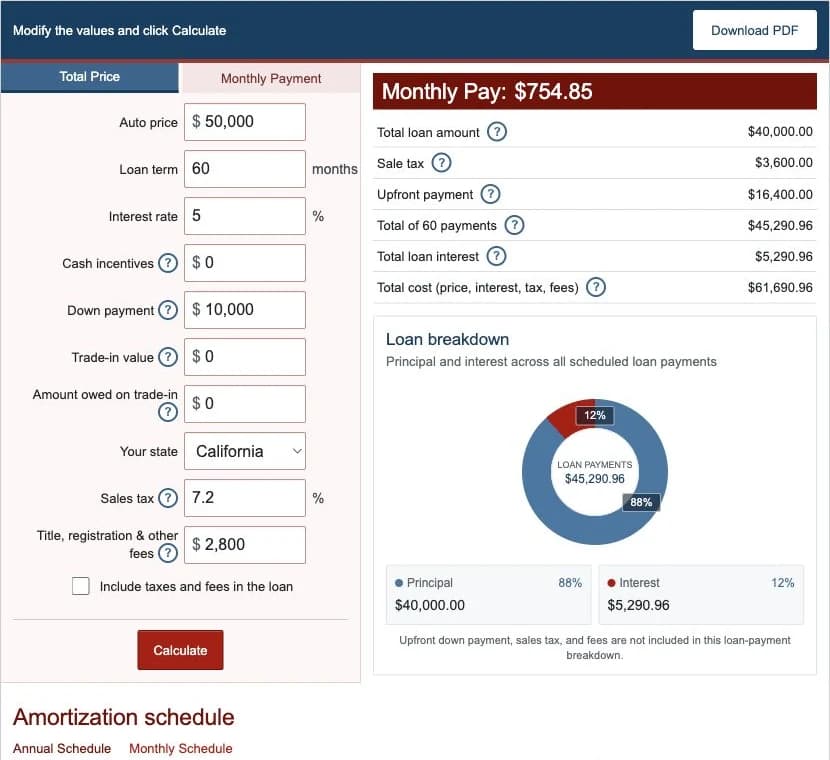
Step 3: Use the Reverse Monthly Payment Calculator
Select Monthly Payment when you want to estimate the vehicle price supported by a target payment. Enter the target payment, rate, term, incentive, down payment, trade-in details, tax rate, fees, and financing choice.
The calculator first determines the principal supported by the payment. It then reverses the purchase adjustments. Treat the result as a budget test, not as permission to ignore insurance, fuel, maintenance, repairs, parking, or registration costs.
Step 4: Calculate and Read the Results
- Monthly payment or vehicle price: the main result depends on the selected mode.
- Total loan amount: the modeled principal after incentives, down payment, trade equity, and financed costs.
- Sales tax: vehicle price multiplied by the tax rate entered.
- Upfront payment: down payment, positive trade equity, and tax or fees paid upfront under the selected option.
- Total of payments: all scheduled principal-and-interest payments.
- Total loan interest: total scheduled payments minus principal.
- Total cost: modeled vehicle price after incentives plus tax, fees, and loan interest.
Use the annual schedule for a compact review and the monthly schedule to inspect individual interest, principal, and ending-balance rows.
Worked Example: $50,000 Vehicle With $10,000 Down
| Vehicle price | $50,000.00 |
|---|---|
| Loan term and rate | 60 months at 5.00% |
| Down payment | $10,000.00 |
| Estimated sales tax | $3,600.00 |
| Entered fees | $2,800.00 paid upfront |
| Amount financed | $40,000.00 |
| Monthly payment | $754.85 |
| Total interest | $5,290.96 |
| Total modeled cost | $61,690.96 |
The first payment contains $166.67 of interest and $588.18 of principal. Because tax and fees are paid upfront in this example, they do not increase the $40,000 principal.
Step 5: Compare Auto Loan Offers
The CFPB recommends comparing more than the monthly payment. Keep the vehicle price and down payment consistent, then review:
- Amount financed
- APR and interest rate
- Number of payments and monthly payment
- Finance charge and total of payments
- Trade-in value and existing payoff
- Every optional add-on and fee
- Prepayment and late-payment terms
Compare dealer financing with a bank, credit union, or other direct-lender offer. Confirm that the written contract matches the negotiated out-the-door price and includes only products you agreed to purchase.