
How to Use a 401(k) Calculator
Follow a step-by-step 401(k) calculator guide for salary deferrals, employer match, editable limits, catch-up contributions, fees, inflation, and goals.
How does this guide help you use the 401(k) Calculator?
This guide explains which values to enter, how the 401(k) Calculator processes them, and how to read the resulting estimate. Follow the sections below to check assumptions, compare realistic scenarios, avoid common input mistakes, and understand when an official source or qualified professional should take priority over a planning result.
This guide explains each field in the 401(k) Calculator, including employer matching, editable legal limits, catch-up contributions, investment costs, inflation, and retirement goals.
The projection uses the plan assumptions you enter. Confirm actual match, vesting, payroll, and contribution rules with your plan administrator.
Before You Start
- Current account balance and age at year end.
- Target retirement age and current annual salary.
- Employee payroll-deferral percentage.
- Employer match rate and the salary percentage eligible for matching.
- Plan fees and an expected return range.
- Current plan and IRS limits applicable to the selected year.
Step 1: Enter Age, Retirement Age, and Salary
Current age controls catch-up eligibility. Retirement age sets the number of annual contribution periods. Enter gross annual compensation relevant to the plan and a salary-growth assumption used once per modeled year.
The engine caps eligible compensation at the entered compensation limit before calculating employee contributions and employer matching.
Step 2: Enter Contributions and Employer Match
Enter the percentage of eligible salary contributed by the employee. Then describe the illustrative employer formula. A 50% match up to 6% means 50 cents per eligible employee dollar until those employee deposits reach 6% of eligible compensation.
The result estimates first-year employee deposits, match, and any missed match. It does not reproduce payroll-by-payroll matching or a year-end true-up.
Step 3: Review Editable Limits
The defaults use the 2026 limits: $24,500 employee deferral, $8,000 age-50 catch-up, $11,250 catch-up at ages 60 through 63, $72,000 annual additions, and $360,000 compensation.
The year and dollar amounts are editable. Entering another year does not automatically load that year's law; update every limit from authoritative guidance and your plan documents.
Step 4: Enter Growth, Fees, Inflation, and Goal
Enter the expected effective annual return, annual investment fee, inflation rate, target balance, withdrawal-rate assumption, return range, and contribution timing. Enable catch-up modeling only when appropriate for the plan.
The withdrawal-rate output is a simple ending-balance percentage divided by 12. It does not test taxes, longevity, market sequence, or distribution rules.
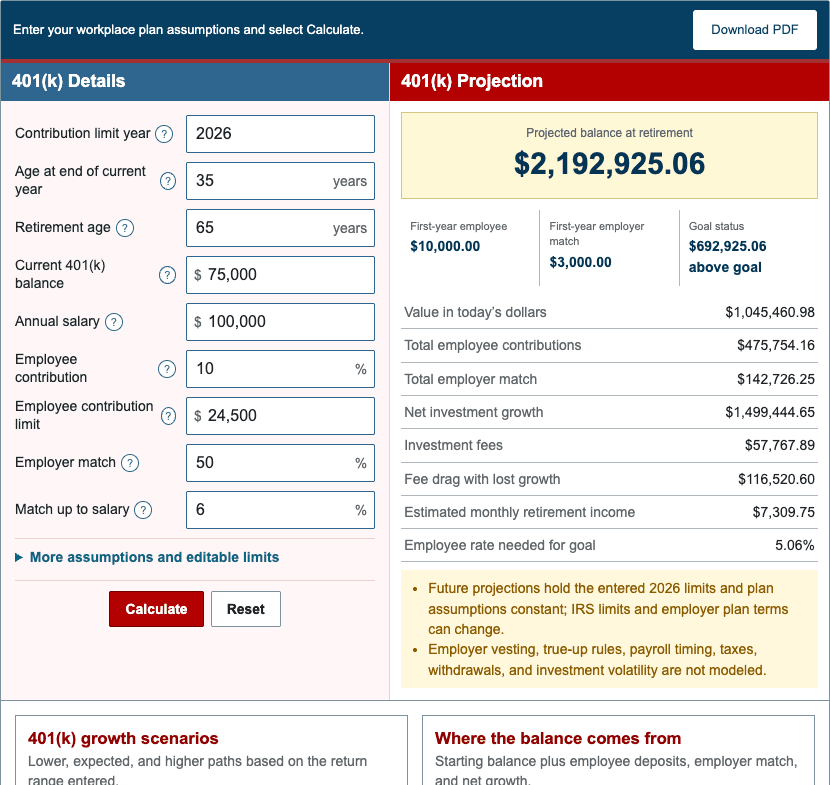
Step 5: Read the Results
- Projected balance: nominal value at retirement after deposits, gross return, and fees.
- Employee contributions: modeled payroll deferrals after entered caps.
- Employer match: illustrative deposits under the entered formula.
- Missed match: first-year match not captured under the entered employee rate.
- Investment growth: ending balance minus current balance and all modeled deposits.
- Fee drag: fee-free ending balance minus the projection with fees.
- Goal result: surplus or gap and solved employee contribution rate.
- Estimated monthly income: ending balance times the entered withdrawal rate divided by 12.
Worked Example: $100,000 Salary and 50% Match
The default starts at age 35 with $75,000, a $100,000 salary, a 10% employee rate, and a 50% employer match up to 6% of salary.
| First-year employee contribution | $10,000.00 |
|---|---|
| First-year employer match | $3,000.00 |
| Projected retirement balance | $2,192,925.06 |
| Total employee contributions | $475,754.16 |
| Total employer match | $142,726.25 |
| Investment growth | $1,499,444.65 |
| Fee drag | $116,520.60 |
These amounts use the production engine and update automatically if the shared defaults change.
Step 6: Stress-Test the Plan
- Compare a lower return and higher fee.
- Reduce salary growth or employer match.
- Test an earlier retirement date.
- Review results with and without catch-up contributions.
- Compare the target in nominal and today's dollars.
- Change one assumption at a time.
References
- IRS - 401(k) and profit-sharing plan contribution limits
- IRS Notice 2025-67 - 2026 retirement-plan limits
Review the 401(k) formulas and worked examples for the exact model.